

What if the cost of running a forex ea 24/7 depends as much on keeping your platform online as it does on trading? Forex markets generally operate 24 hours a day, five days a week, but an EA’s runtime is a separate issue: it needs a connected trading platform to operate, even when no trades can execute.
That distinction makes budgeting less straightforward. The EA purchase is only one part of the picture. Hosting, electricity, internet reliability, broker charges and trading capital all affect your costs. A low-cost setup can also become costly if interruptions prevent the software from running as planned.
This guide separates recurring infrastructure expenses from trading charges, compares a local computer with a VPS, and shows you how to build a monthly and annual estimate from your own bills and account records.
The goal is a budget based on your setup, not a generic price tag. An EA is software for independent use, so hosting decisions, broker charges and risk management remain part of your operating plan.
Key Takeaways
- Separate platform availability from the hours when the forex market is open and trades can execute.
- Map the cost of running a forex ea 24/7 by separating infrastructure, software, and trading expenses.
- Compare a local computer and a VPS against your power, internet, access, and maintenance requirements.
- Use a simple worksheet to total your own recurring costs into monthly and annual budgets.
- Choose an operating setup that fits your workflow while keeping oversight and market risk in view.
Does running a Forex EA 24/7 mean trading around the clock?
No. Keeping a Forex EA available around the clock means maintaining the software environment it needs to operate. It doesn’t mean the EA can place trades every hour of the week. The foreign exchange market generally operates five days a week, while exact opening and closing times can vary by trading session, daylight-saving changes, broker, and instrument. Confirm the schedule that applies to your account before planning an operating window.
Quotable distinction: EA uptime describes whether the trading system is online; market hours determine when it can access trading opportunities.
This distinction matters when estimating the cost of running a forex ea 24/7. A computer or VPS may stay on during weekends, even when normal forex trading is closed. That time can still support platform access, log reviews, and preparation for the next session. It shouldn’t be counted as continuous forex execution or treated as a promise that the EA will trade.
Forex EAs are a form of algorithmic trading, where software follows programmed rules. Continuous availability describes the system’s ability to run. It doesn’t establish that the strategy is suitable, that a trade will occur, or that a person is actively supervising it.
What does 24/7 EA operation actually keep online?
Think of operation as a chain of dependencies: the EA needs the MetaTrader terminal open, the operating system running, and an internet connection linking the platform to the broker’s server. On a local computer, a shutdown, sleep mode, connection loss, or platform failure can interrupt EA operation. Keeping the device powered on isn’t enough if another required component is unavailable.
An active EA evaluates conditions according to its programmed logic, but that isn’t the same as continuous human monitoring. A running terminal doesn’t confirm that the system is behaving as intended. Check connection status, logs, and account activity regularly.
Can a forex EA place trades every hour of the week?
No. Always-on software can’t create market access when the relevant market is closed. A computer or VPS can remain operational through periods when the EA has no normal forex session in which to execute. Trading hours can depend on the instrument and broker, so don’t assume that every product follows the same schedule or that weekend access is available.
Separate two questions in your operating plan: “Is the platform online?” and “Can this instrument be traded now?” The first relates to uptime and infrastructure. The second depends on the market schedule and account conditions. Weekend access may help you prepare or review, but it doesn’t extend the regular forex trading week.
For budgeting, count the hours you need the system available, then account separately for when the EA can act in the market. This keeps hosting decisions grounded in your continuity needs rather than the mistaken assumption that 24/7 uptime means round-the-clock trading.
What makes up the cost of running a Forex EA continuously?
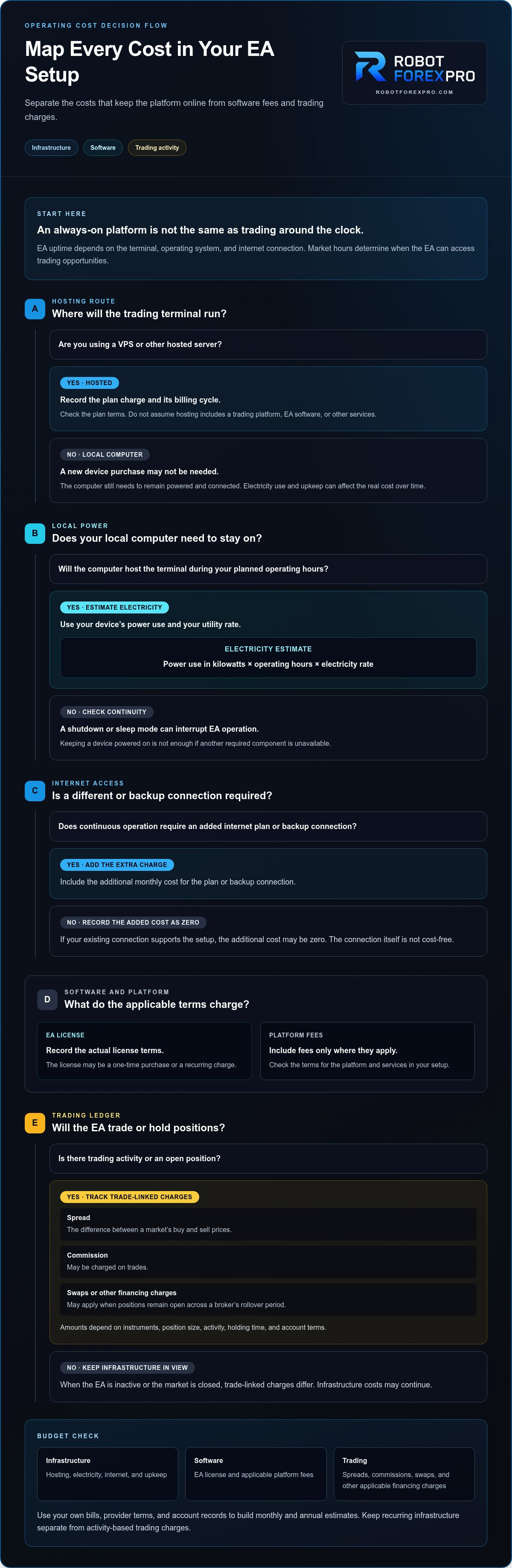
The full budget has several layers. Some expenses keep the system available; others arise only when you trade or hold a position. Separate them so that a VPS subscription isn’t mistaken for the total cost, and trading charges aren’t confused with hosting fees.
Quotable summary: Budget separately for hosting, electricity, internet, applicable platform fees, EA licensing, spreads, commissions, and swaps.
For the cost of running a forex ea 24/7, record each item by how it occurs: monthly, usage-based, per trade, or one-time. This makes your operating costs easier to understand and compare.
Infrastructure expenses: VPS, electricity, and internet
A VPS or other hosted server typically has a recurring plan charge, with billing terms and included resources set by the provider. Record the amount and billing cycle for the plan you select. Don’t assume hosting includes a trading platform, EA software, or other services unless the plan terms explicitly say so.
A local setup uses your own computer, so it may not require a new device purchase. It still consumes electricity, and the computer must remain powered and connected. To estimate electricity, multiply the device’s power use in kilowatts by its operating hours, then multiply by your electricity rate. Use the figures for your device and utility bill.
Internet is another operating input. If your existing connection supports the setup, record any additional cost as zero, but don’t treat the connection itself as cost-free. If continuous operation requires a different plan or backup connection, include the added monthly charge. Equipment maintenance and replacement can also affect the real cost over time.
Trading and software expenses to keep separate
Broker charges depend on account terms and trading activity, not on whether the EA is hosted locally or on a VPS. A spread is the difference between a market’s buy and sell prices. Commission may be charged on trades, while swaps or other financing charges can apply when positions remain open across a broker’s rollover period. The instruments traded, position size, activity, holding time, and account terms all affect the amounts.
Keep these charges in a separate trading ledger. A system that opens and closes positions frequently can generate different spread and commission totals from one that holds fewer, longer positions. When the EA is inactive or the market is closed, trade-linked charges differ, though infrastructure costs may continue.
EA licensing is a separate software expense. Depending on the applicable license terms, it may be a one-time purchase or a recurring charge. Record the actual terms for the EA you use. Include platform-related fees only where they apply to your setup. RobotForexPro sells currency- and gold-focused Forex EAs for independent use. Buying software doesn’t remove responsibility for hosting, broker costs, or risk management.
Build the budget in distinct lines: infrastructure, software, platform, and trading. This helps you see which costs continue during inactive periods and which change with trading decisions.
Local computer or VPS: which setup offers better value?
Neither setup is automatically cheaper. Compare the VPS plan’s recurring charge with a local computer’s electricity, internet, equipment, and maintenance costs. Use your own bills and provider terms rather than generic averages. Then weigh the totals against how much responsibility you’re prepared to take for keeping the system available.
For a practical comparison, record these items for each option:
- Monthly infrastructure: VPS subscription, or the local computer’s additional electricity and connectivity costs.
- Existing resources: computer and internet equipment you already own, while accounting for their use and eventual upkeep.
- Continuity dependencies: home power, router, internet service, device settings, or the VPS provider’s service.
- Management effort: updates, restarts, platform checks, and troubleshooting you’ll handle yourself.
- Access needs: how you’ll reach the platform and monitor the setup when away from your main computer.
This makes the cost of running a forex ea 24/7 a comparison of both money and operating responsibility. A lower monthly bill may require more hands-on management. A recurring hosting charge may reduce reliance on home equipment, but it doesn’t remove every point of failure.
When a local computer may be sufficient
A local setup can work if you have a compatible computer, the trading platform can stay running, internet service is stable, and power is available when you need it. You avoid a separate hosting plan, but remain responsible for the home device and its dependencies. Sleep settings, reboots, outages, or a disconnected router can interrupt operation. A local computer doesn’t guarantee uninterrupted uptime.
Count incremental costs rather than treating existing equipment as free. Include the electricity used while the computer is running, any connectivity costs specific to the setup, and maintenance or replacement needs. If the computer is already used for other tasks, consider how running the platform affects your use of that device.
When a VPS may justify its recurring fee
A VPS hosts the operating environment remotely, reducing dependence on your personal computer being switched on and connected at home. It can suit traders who need remote access to a persistent platform or don’t want a trading terminal occupying a household device. Compare plan billing terms, available resources, remote access, and support for the platform you intend to run.
Hosting shifts some dependencies; it doesn’t eliminate operational risk. Provider or network interruptions, platform problems, configuration errors, and account conditions can still affect operation. An uptime commitment, where offered, describes a hosting service level, not profitable execution or protection from market losses.
For platform setup and maintenance details, the MT5 EA deployment and upkeep guide can help you account for the work involved. Choose the arrangement whose total cost and maintenance demands fit your workflow. An EA remains software for independent use, so hosting decisions don’t replace oversight or risk management.
How to calculate your own monthly and annual EA running cost
Build the estimate from your own bills, account records, and software terms. Keep predictable operating expenses separate from trade-dependent charges. This gives you a useful baseline without treating past trading activity as a promise of future costs.
Build a fixed operating-cost baseline
Start with expenses required to keep your chosen setup available. Record each amount, its billing period, and whether it’s essential or optional. If a charge is billed annually or quarterly, convert it to a monthly equivalent by dividing it across the months it covers.
- Hosting: Enter the VPS or server charge and billing cycle. If you use a local computer, enter zero for a separate hosting plan, but track electricity and related costs below.
- Electricity: For local operation, estimate the computer’s energy use from its power consumption and operating hours, then apply your electricity tariff. Keep your assumptions with the calculation.
- Connectivity: Record any additional internet or backup-connection expense needed for the setup. Separate an existing household plan from a new or upgraded recurring charge.
- Platform and software: Include applicable platform fees and the EA’s actual licensing cost. Mark a one-time EA purchase separately from any recurring software charge. The Forex EA software buying guide can help you assess software purchase and licensing as distinct budget items.
- Optional items: List non-essential services or equipment separately so you can see how they change the baseline without blending them into required costs.
Add the monthly equivalents of recurring items to get a fixed monthly baseline. Multiply that figure by twelve for a simple annual baseline. Keep one-time purchases in a separate first-year total; don’t multiply them as if they recur monthly. If a bill changes during the year, use the actual amount for each period instead of assuming one rate applies throughout.
Add variable trading costs without confusing the totals
Use a separate ledger for spreads, commissions, and swaps. Refer to your trading account’s applicable terms and record charges from actual activity. Note the instrument, trade volume, and holding period when available. These costs can vary with the EA’s activity and account conditions, so historical charges are a reference, not a guaranteed forecast.
Your worksheet should show two distinct figures: operating expenses for keeping the setup available, and trading charges generated by account activity. The combined total can help estimate the cost of running a forex ea 24/7, but the categories remain useful on their own. EA performance is a separate measure. Profit or loss doesn’t replace the expense record or establish what future activity will cost.
Once your worksheet is complete, compare it with the software that fits your approach. Explore Forex EA options as part of your independent operating and trading budget.
Choose an EA operating setup that fits your trading workflow
Use your worksheet to decide what matters most: lower direct expense, less dependence on home equipment, or easier remote access. The best fit is the setup you can maintain within your budget. A VPS may suit you if you need the platform available while you’re away; a local computer may work if you can keep it running and manage its dependencies.
Before choosing, compare the setups against three practical questions:
- Continuity: How disruptive would a power, internet, device, or hosting interruption be to your workflow?
- Access: Do you need to reach the platform when you’re away from your home computer?
- Responsibility: Which setup can you monitor, maintain, and troubleshoot consistently?
Revisit your monthly and annual totals for each option. Include not only recurring charges, but also the time and equipment required to manage a local system. The lowest listed expense isn’t automatically the best value if it depends on a setup you can’t maintain as planned.
Match the setup to your uptime requirements
If you need platform access away from home, remote hosting may better match your workflow. If you can keep a compatible local device powered, connected, and available, a home setup may be workable. Compare the VPS charge with local electricity and connectivity costs, then weigh both against your maintenance responsibilities. No setup removes the need to monitor platform and account status.
Plan for interruptions, too. A VPS reduces reliance on your personal computer, but provider, network, platform, or configuration problems can still affect operation. A local computer depends on home power and internet, as well as correct device settings. Choose based on the dependencies you can manage, not an assumption of uninterrupted service.
Evaluate EA software as a separate decision
Hosting keeps the operating environment available. It doesn’t determine whether an EA fits your strategy or platform. Review its stated approach, verify compatibility with your trading platform, and assess performance evidence carefully. Independently reviewed records can add useful context, but past results don’t guarantee future outcomes. Demo testing can also help you observe how an EA behaves before deciding about live use.
For gold-focused software, use a separate comparison process that considers strategy and supporting evidence, such as this gold trading EA comparison guide. Treat the EA purchase, hosting choice, broker charges, and risk controls as distinct decisions. RobotForexPro sells trading software for independent use, not brokerage or managed-account services or guaranteed-return investments.
The cost of running a forex ea 24/7 is only one part of the decision. Match the software to your workflow, set a realistic operating budget, and maintain oversight of platform status and trading risk. To compare systems for your own research, explore the Forex EA software portfolio.
Put your EA plan into practice with clear controls
Before deploying an EA, define how you’ll review its operation and reassess your budget as trading activity changes. Set a regular time to compare actual expenses with your estimate, check that your platform and account remain configured as intended, and consider whether the setup still fits your access needs. The cost of running a forex ea 24/7 is a planning input, not a measure of strategy performance or a substitute for risk controls.
Software selection deserves the same discipline. RobotForexPro provides proprietary Forex Expert Advisors for independent retail traders, including specialized options for currency and gold trading. Evaluate the strategy and platform fit against your workflow, then include hosting and oversight in your plan. No EA removes market risk or your responsibility to monitor trading activity.
Compare RobotForexPro’s Forex Expert Advisors and identify software to assess for your trading approach: explore the Forex EA portfolio.
Frequently Asked Questions
Can a forex EA really trade 24/7?
No. An EA can remain active continuously, but ordinary forex trading generally follows a five-day weekly schedule. During a market closure, the terminal may stay open and the EA may keep checking its programmed conditions, but it can’t execute an ordinary forex trade without an open market and broker access. Hours can vary by instrument and broker, and holidays can affect sessions. Use the relevant schedule when planning availability.
How much does it cost to run a forex EA on a VPS?
There’s no single VPS cost that applies to every EA setup. The charge depends on the provider’s plan, assigned resources, billing terms, and platform requirements. Use the current details for the plan you select, then enter its monthly equivalent in your budget. Keep hosting separate from the EA’s software license and broker trading charges, which follow their own terms and may vary with account activity.
Can I run a forex EA on my home computer instead of a VPS?
Yes. A suitable local computer can run a MetaTrader terminal and EA while it’s powered on, connected to the internet, and configured to stay available. Compare electricity, connectivity, and maintenance needs with the VPS plan you’d otherwise use. Consider whether system restarts or household internet interruptions could affect your workflow. Neither setup guarantees uninterrupted operation, trade execution, or trading results.
What costs should I include when budgeting for a forex EA?
Include hosting or local electricity, internet, applicable software licensing, and variable broker charges such as spreads, commissions, or swaps. Keep fixed operating expenses separate from costs tied to trades or open positions. The actual cost of running a forex ea 24/7 depends on your device, provider, account terms, and trading activity. Use your bills and account records rather than unsupported averages.
Does an EA keep trading when the forex market is closed?
No. The EA and platform may remain on, but ordinary forex order execution depends on the relevant market being open and the broker providing access. A status showing that software is running doesn’t mean orders can be placed or filled. Session times, holidays, and instrument schedules can affect availability, so don’t assume one universal reopening time. Refer to the schedule for your instrument and broker before setting expectations.
Is a VPS necessary to run a forex EA continuously?
No. A VPS is one deployment option, not a requirement in every case. A local device can host the platform if you’re willing to keep it powered, connected, and maintained. Compare the recurring hosting charge with the cost and responsibility of managing your own equipment. A VPS can reduce dependence on a home computer, but hosting alone can’t guarantee continuous execution, prevent losses, or replace account oversight.