

The newest EA isn’t automatically the best fit for your trading setup. A search for the latest updated versions of ea can surface newer builds, but version numbers alone won’t tell you whether an option matches your instrument, platform, or preferred strategy.
An update can address compatibility or change features and settings, so compare product details before replacing an EA. RobotForexPro develops and sells automated Expert Advisors for retail currency and gold traders. Its lineup includes RFP GoldenStar EA, RFP MultiPair EA, RFP Gold V5.7 EA, RFP AlphaHype EA, RFP JapanStrike EA, RFP EuroStable EA, and RFP SmartProfit EA. Compare the information given for each product rather than inferring its function from its name.
This guide explains how to compare options, review version information, and approach an update carefully. Before installing or switching versions, note the details of your existing setup and check the EA’s stated compatibility and settings. Backtesting and demo testing can help you observe an EA’s behaviour in your own trading environment before considering live use. No EA removes market risk or guarantees results, so assess each option on verifiable product facts, not profit claims.
Key Takeaways
- Shortlist an EA by matching its stated instrument and platform to your trading setup before comparing strategy details.
- Use the latest updated versions of ea as a starting point, not proof of improved results; version changes may affect features or settings.
- Record your current version, parameters, platform, and account configuration before installing an update.
- Use historical backtesting and demo forward testing to observe an EA’s behaviour before considering live deployment.
- Compare RobotForexPro’s EA lineup, then review each product’s stated details, compatibility, and licence terms.
What “latest updated EA versions” means for a trading system
Choosing a current EA starts with more than finding the newest version number. An Expert Advisor is automated trading software designed to operate through a compatible trading platform. It follows programmed rules to analyze market conditions and, depending on its design, manage trading actions. This is one application of Algorithmic trading, where software executes instructions according to defined logic.
For a useful comparison, keep four details separate. The version identifies a software release. The strategy describes the trading logic, such as a trend-based or reversal approach. The instrument identifies the market the EA is designed to trade, such as gold or a currency pair. The platform specifies where it can run. A recent release doesn’t automatically change the other three details.
These distinctions matter because an EA’s name or release label may not explain its function. A version number alone won’t tell you which market it targets, how its strategy operates, or whether it matches your platform. Check those details independently before treating an option as a fit. That is the practical meaning behind searches for the latest updated versions of ea: identify the software release, then assess whether its documented setup suits your trading requirements.
What can an EA update change?
An update may revise code, parameters, execution behaviour, or platform compatibility, but only published release information can show what changed in a particular EA. Don’t infer new features or a strategy redesign from a higher version number. Compare the stated changes with the version you currently use, and note any documented adjustments to settings or operating requirements.
Maintenance and strategy evidence are different things. A release that addresses compatibility or corrects a software issue may improve the EA’s operation, but that alone doesn’t establish that its trading approach will perform better. Treat update notes as technical information, not as proof of trading results.
Why “newest” does not automatically mean “right for you”
Suitability depends on the intended instrument, your trading approach, and the platform installed on your system. For example, an EA described for gold isn’t automatically suited to a currency pair, and a listing for one platform doesn’t imply compatibility with another. Match each product detail to your setup rather than assuming versions or platforms are interchangeable.
Release recency and promotional wording can help draw attention to an option, but neither replaces clear specifications. Review the documented instrument, strategy description, and platform requirements first. Then consider whether the release details support a change to your current setup.
An EA update is not a profit guarantee. Automated trading remains exposed to market risk, and outcomes can vary with market conditions and account settings. Use version information to understand the software, not to predict results.
How to compare updated Expert Advisors before choosing one
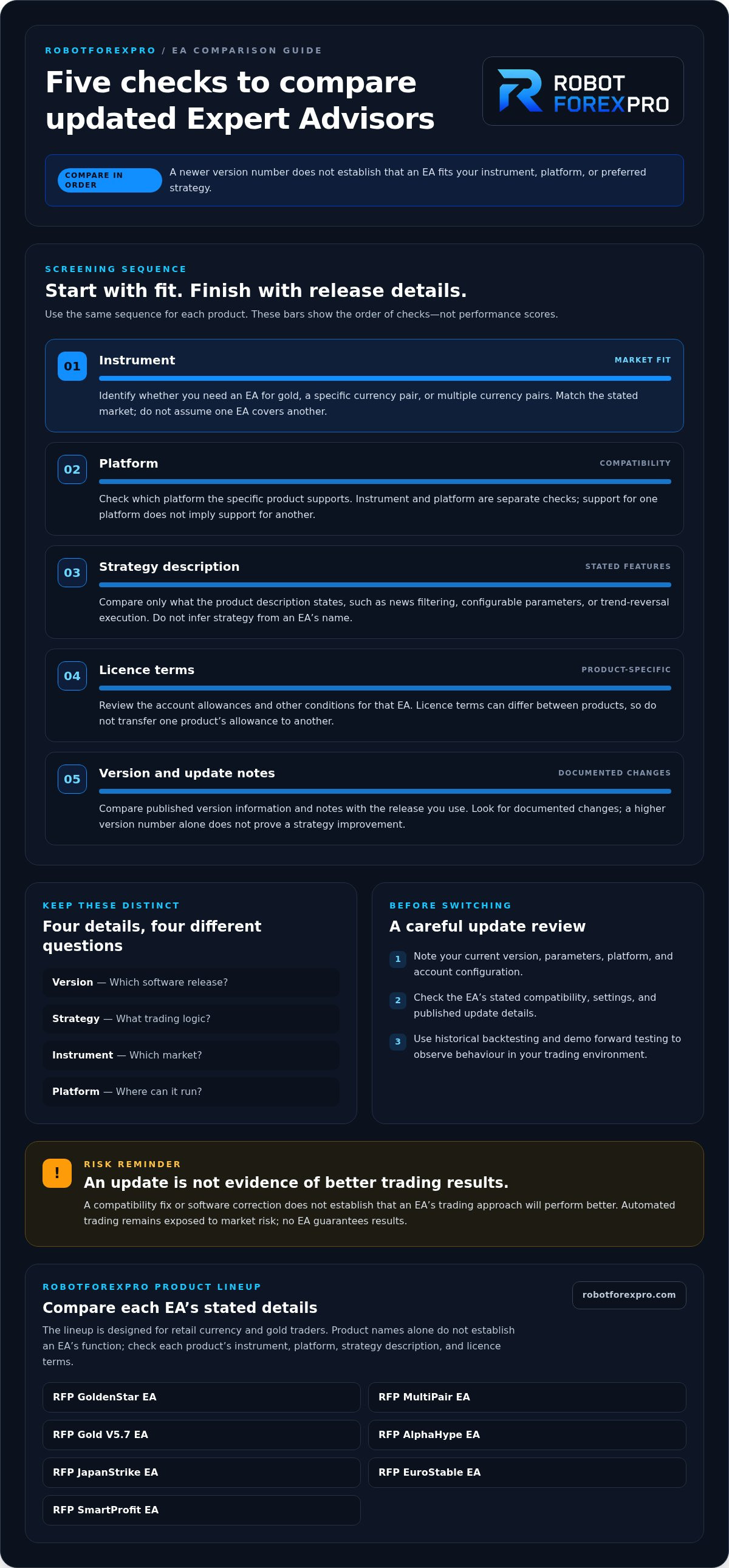
Use a fixed comparison sequence to narrow the latest updated versions of ea without relying on release labels or performance claims. Start with the market you trade, then check platform fit, strategy description, licence terms, and version details. A mismatch at any stage can make an EA unsuitable for your setup.
- Identify the instrument. Decide whether you need an EA for gold, a specific currency pair, or multiple currency pairs. Match the product’s stated market to the instrument you intend to trade; don’t assume an EA designed for one market covers another.
- Confirm the platform. Check the product information for the platform it supports. Treat platform requirements as specific to each EA. Don’t assume software that supports one platform will run on another.
- Read the strategy description. Compare only the characteristics the product description states. These may include news filtering, configurable parameters, or trend-reversal execution. Don’t infer a strategy from the EA’s name.
- Review licence terms. Check the specific product’s account allowances and other licence conditions. Terms can differ between EAs, so don’t transfer one product’s allowance to another.
- Check version and update details. Compare the version information and any published notes with the version you use. Look for documented changes rather than assuming a newer label means a strategy improvement.
Match the instrument and platform first
Instrument and platform are independent filters. Platform and instrument compatibility are separate checks. For example, choosing an EA for gold doesn’t tell you which platform it supports, and seeing a platform named in a listing doesn’t establish which market the EA targets.
RobotForexPro’s proprietary EA lineup is designed for retail currency and gold traders and includes options such as RFP GoldenStar EA, RFP Gold V5.7 EA, and RFP MultiPair EA. Use the individual product information to identify the intended market and platform before installing or purchasing. The SEC Staff Report on Algorithmic Trading also offers broader context on automated trading risks; it doesn’t replace checking an EA’s own specifications.
Comparison snapshot
Markets: Start with the instrument or instruments you intend to trade, then confirm the market stated for each EA.
Platforms: Check the individual product information for its stated platform compatibility. Don’t assume that an EA will work across platforms.
Strategy details: Some EA descriptions may state characteristics such as news filtering, configurable parameters, or trend-reversal execution. Match those details to the specific product and don’t assume they apply to the whole collection.
Version and licence: Review the version information, account allowance, and product-specific licence terms for the EA you are considering.
Compare strategy, licence, and version information
Keep the comparison evidence-based. If a description names a strategy feature, record it alongside the instrument and platform. If it doesn’t, don’t fill the gap with assumptions. Apply the same discipline to licence terms and update notes. This makes the shortlist easier to evaluate and helps prevent an update from being mistaken for evidence of better trading outcomes.
Use these criteria to browse the updated Expert Advisor collection, then compare the individual product information against your intended setup.
Updated EA options by market and platform: products to compare
Compare products by their stated instrument and platform, then use each strategy description to decide whether it fits your approach. The options below are examples from RobotForexPro’s lineup, not a performance ranking. Product details and version status can change, so use the current product information as your reference before choosing.
Gold and currency-specific options
RobotForexPro’s lineup includes RFP GoldenStar EA and RFP Gold V5.7 EA, along with currency-focused options such as RFP JapanStrike EA and RFP EuroStable EA. Their names alone are not enough to establish a product’s market, platform, strategy, or current version. Review the information for each EA and compare the stated requirements with your setup rather than assuming two similarly themed products work in the same way.
For a meaningful comparison, record the market and platform specified for each candidate, then note any strategy features and settings the product information actually describes. If a detail isn’t stated, leave it out of the comparison instead of guessing from the product name. This helps distinguish a genuine product difference from an assumption.
RobotForexPro’s portfolio is designed for retail currency and gold traders. That broad focus can help you identify relevant products, but the individual EA’s own specifications should guide your decision about instrument and platform fit.
EUR/USD and multi-pair options
RobotForexPro’s lineup includes RFP EuroStable EA and RFP AlphaHype EA, as well as RFP MultiPair EA for traders considering a multi-pair approach. RFP JapanStrike EA and RFP SmartProfit EA are also part of the portfolio. These product names identify options to compare, but don’t by themselves confirm a particular instrument, platform, or strategy.
For each candidate, look for the market it is designed for, its platform compatibility, and any stated strategy details. If an EA is intended for more than one pair, use the product information to establish which pairs it covers. For any strategy features, compare the descriptions as written rather than assuming that similar names mean similar trading logic.
These details provide useful comparison filters, but they don’t establish a ranking or forecast results. The aim is to narrow the list to products whose stated specifications match your setup, then assess those products on their own terms.
Quick comparison: RobotForexPro’s lineup includes RFP GoldenStar EA, RFP Gold V5.7 EA, RFP JapanStrike EA, RFP EuroStable EA, RFP AlphaHype EA, RFP MultiPair EA, and RFP SmartProfit EA. Use each product’s current information to compare instrument, platform, stated strategy, version, and licence terms before installing or purchasing.
Use these examples to narrow the latest updated versions of ea by product details, then compare documented specifications without relying on unsupported performance claims.
How to handle EA updates, testing, and trading risk
An EA update changes the software running in your trading setup. Treat it as a controlled change, not a routine file replacement. A simple record of the old configuration gives you a baseline for identifying differences and restoring your previous setup if needed. Testing can reveal compatibility issues or changed behaviour, but it cannot establish how the EA will perform in future market conditions.
A controlled update review workflow
Before changing files, capture your installed version, EA settings, platform and build, and account configuration. Save a copy of existing files and settings where your platform permits. This record helps you distinguish an update-related change from a difference in your test setup.
- Compare release information. Check the installed version against the version and change notes shown in the product information. Focus on documented changes, such as compatibility notes or revised parameters. Don’t infer changes from the version number alone.
- Preserve the baseline. Record the current inputs and account setup before replacing an EA file. Note any settings you alter after installation so you can reproduce the test or identify which change affected the result.
- Test in stages. Use the platform’s strategy-testing tools for historical analysis, then run the revised EA on a demo account to observe its operation in a live-feed environment. Keep the instrument, platform, and relevant settings consistent when comparing versions.
- Review before deployment. Check for unexpected behaviour, platform errors, or differences from the documented strategy. If results differ, investigate the setup and settings before considering live use.
For a structured assessment, review the site’s guide to evaluating Forex robot performance metrics alongside this test record. A metric is useful only when you understand what it measures and the conditions behind it.
Separate software quality from trading risk
A successful installation or clean backtest addresses only part of the decision. Market conditions can change, while spreads, slippage, execution, and account risk settings can affect live trading. Historical data and demo observations offer evidence about behaviour under specific conditions. Neither predicts future outcomes or removes the possibility of loss.
Be cautious with results that lack clear test settings or supporting context. The guide to fake Forex EA backtests and results can help you assess whether a performance presentation is transparent about its data and methodology. Don’t treat a polished graph, a recent version, or a favorable demo period as proof of future returns.
Keep risk controls in view throughout the process. Set exposure in line with your own risk limits, and avoid increasing live risk simply because an update appears to behave as expected in testing. No EA update guarantees profit.
Apply this review process to the updated Expert Advisor collection, comparing each product’s version and specifications with your recorded setup before making a change.
Choose your updated EA and browse the RobotForexPro collection
The right shortlist starts with your setup, not a universal “best” EA. Use the instrument and platform you actually trade as filters. Then compare each candidate’s stated strategy, version details, and licence terms. This makes the latest updated versions of ea easier to assess on relevant product facts rather than release labels or unverified return claims.
Build a shortlist around your trading setup
Use this instrument-led approach to identify candidates. It’s a shortlist, not a performance ranking:
- Gold: Compare the RobotForexPro EAs whose product information identifies gold as an intended market. Check the stated platform and any account or capital requirements before deciding whether the EA fits your setup.
- Currency pairs: Review currency-focused options such as RFP JapanStrike EA and RFP EuroStable EA. Use their product information to confirm the market, platform, and stated strategy details.
- Multiple pairs: Consider RFP MultiPair EA if its listed market coverage fits your intended instruments. Use the product description to establish the strategy details rather than inferring them from the name.
- Other options: Compare RFP GoldenStar EA, RFP Gold V5.7 EA, RFP AlphaHype EA, and RFP SmartProfit EA by their documented specifications. The product names alone aren’t a substitute for checking fit.
These examples help narrow the field, but no EA suits every trader. A match on instrument alone isn’t enough. Confirm the specific platform, compare the strategy description with your approach, and consider whether its settings and account requirements fit your setup. Don’t rank candidates by return figures unless the evidence and testing conditions can be assessed independently.
Browse the collection and review the product details
Before deciding, open each product listing and verify the version, platform compatibility, instrument, and licence terms stated for that EA. Review any published update details alongside the version you use. Licence conditions can vary between products, so check the terms for the specific EA rather than assuming one product’s allowance applies to another.
Use the product information to understand the EA’s stated purpose and requirements. Record its version and settings before making a change, and compare the release details with your current setup. If the information doesn’t establish a relevant detail, don’t infer it from the product name or from another EA’s specifications.
Make the final choice through fit and verification. Match the product to your market and platform, assess its stated strategy, and use a controlled test before considering live deployment. Updates don’t guarantee better results, and trading carries risk.
Browse the updated Expert Advisor collection to compare products by instrument, platform, and documented details.
Make your next EA choice a measured one
Turn your comparison into a decision you can explain and review. Choose a candidate that fits your current trading setup, record why it made your shortlist, and define what evidence you need before moving from testing to live use. This keeps the focus on operational fit rather than the appeal of a new release label.
Use the latest updated versions of ea as a search starting point, not a selection rule. Your platform, trading approach, and risk limits should guide the decision. Revisit your choice if those requirements change, and assess future updates against the same criteria. A consistent review process is more useful than chasing every release, because it helps you distinguish a relevant software change from one that doesn’t affect your setup.
Explore the RobotForexPro collection and compare individual product details against your shortlist. Browse the latest updated Expert Advisors to identify options that align with your trading setup. Take a deliberate approach, test carefully, and move forward with confidence grounded in product facts.
Frequently Asked Questions
Does a newer version of an EA guarantee better trading results?
No. A newer version identifies a software release, not a verified improvement in trading outcomes. For example, an update may address a technical issue without changing the strategy. Compare the release notes with your reason for considering the update, then assess the revised EA under controlled conditions. The latest updated versions of ea still operate in changing markets, so treat test results as observations, not promises of future performance.
Can I use an MT4 Expert Advisor on MT5?
Don’t assume an EA built for one platform will run on another. Platform compatibility depends on the specific software version and how it was built. Check the EA’s product information for the platform it supports before installing it. If you switch platforms, treat that as a separate setup change and test the EA in the target platform before considering live use.
Are updated EA versions free for existing licensed customers?
Update access and any associated terms depend on the specific product licence. Review the licence for your EA and the product information for its update terms. Keep a record of the version you received so you can distinguish the software release from changes you make to its settings.
What should I save before replacing an EA with an updated version?
Save the current EA file if available, its version identifier, and a copy or written record of its input settings. Record the platform and build, account configuration, and instrument used. This creates a reference point if the updated EA behaves differently or a setting needs to be restored. After installing the new version, document any changed inputs separately instead of overwriting your baseline notes.
What happens if an EA is marked under update?
A label such as “under update” indicates that the product information presents the EA as being updated. It doesn’t, by itself, specify a release date, the changes being made, or when the software will be ready for use. Read the current product information for its stated status and details before making plans around it. Don’t treat the label as evidence of a strategy change or expected trading results.
Can an Expert Advisor guarantee consistent profits?
No. An Expert Advisor can’t guarantee consistent profits or remove the risks of trading. Results may differ as market conditions and execution change, and account settings also affect exposure. Treat claims of certainty with caution. Before live use, define acceptable risk for your account and evaluate how the EA operates in a test environment. Even careful testing can’t guarantee that future trading will match past observations.