

What if a multi pair forex ea adds exposure rather than diversification? Trading several currency pairs can spread activity across markets, but correlated positions may still rise or fall together. More charts alone do not make a stronger portfolio system.
Broader pair coverage and automated execution can be useful, but the key question is whether the EA’s strategy, risk controls, and operating requirements fit your account and workflow. Drawdown, track-record length, and how performance data is verified all affect how results should be judged.
This guide explains how multi-pair automation differs from single-pair trading and provides a consistent framework for comparing pair coverage, trading logic, cross-pair exposure, performance evidence, and platform needs. It also introduces RFP MultiPair EA as a product to evaluate against those criteria. Automation and past results do not promise profit. Use the checklist to make a measured decision based on the system’s mechanics and the risks you are prepared to manage.
Key Takeaways
- Assess open positions across pairs as one portfolio. Pair count alone does not establish diversification.
- Compare each multi pair forex ea by its documented strategy, pair scope, platform, performance evidence, and operating requirements.
- Separate written specifications from marketing claims, and review account data in the context of its track record and drawdown.
- Set objectives and risk limits before testing, then monitor the system against them.
- Evaluate RFP MultiPair EA using the same checklist as any other system. Automation does not guarantee an outcome.
What a Multi Pair Forex EA Does: What Pair Count Does Not Tell You
A multi pair forex ea is trading software programmed to open, manage, or close trades across more than one currency pair. It applies predefined rules to market data through a trading platform. An EA can automate execution, but it cannot remove market risk, platform interruptions, price slippage, or other execution risks.
The difference is about more than the number of charts. One system may apply shared rules across several markets, while separate single-pair EAs may each use their own settings and make independent decisions. The setup depends on the EA’s design. For context on the environment these systems operate in, the Foreign Exchange Market Overview outlines the market’s structure, participants, and operations.
How does multi-pair automation differ from a single-pair EA?
A single-pair EA is configured to trade one market. A multi-pair system may use coordinated rules to assess several pairs, or manage each pair through separate logic within the same software. The label alone does not reveal how it is built.
Running independent single-pair robots on separate charts can create several decision processes. Each may open trades without accounting for the others. A coordinated design could consider activity across markets together, but do not assume every multi-pair EA does this. Review how the specific system handles signals, positions, and shared limits.
Why more traded pairs do not automatically mean more diversification
Currency pairs can share exposure to the same currency or respond to common events. For example, an EA holding positions in EUR/USD and GBP/USD has exposure to the US dollar through both trades. Their prices may move in similar or different ways depending on market conditions. This is an illustration, not a claim that the pairs always have a fixed correlation.
Assess open positions as a group. Consider which currencies appear across trades, whether positions could be affected by the same market event, and how the system controls combined exposure. A higher pair count can mean more simultaneous positions and more moving parts, not necessarily less risk.
- Check the exposure: Identify currencies shared across open trades.
- Review the rules: Determine whether risk limits apply per trade, per pair, or across the account.
- Test the assumption: Do not treat pair count as proof that positions offset one another.
The useful measure is not how many pairs an EA can access, but how its rules manage the positions those markets generate. A system that trades several pairs still needs to be evaluated as a connected set of decisions, with its operating logic and risks understood before use.
How a Multi Pair Forex EA Builds and Manages Cross-Pair Exposure
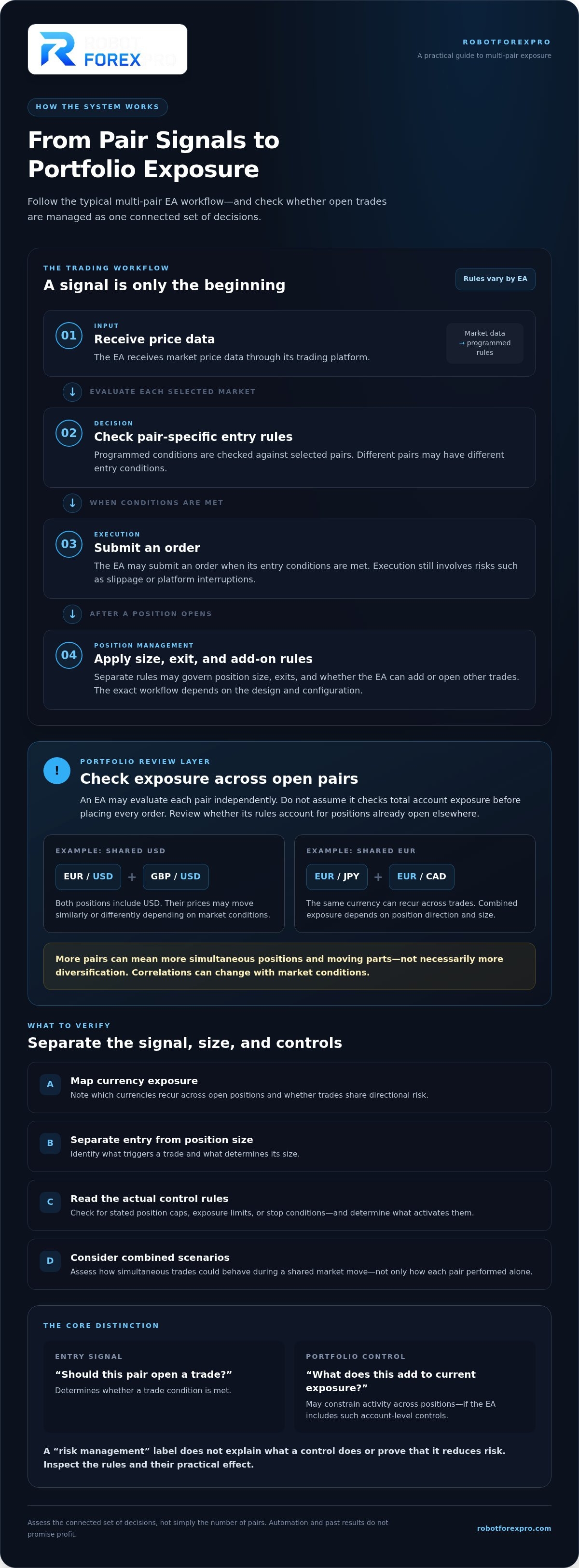
A multi pair forex ea typically follows a sequence: it receives price data, checks selected pairs against programmed entry rules, and may submit orders when conditions are met. After a trade opens, separate rules may govern position size, exits, and whether the system can add or open other trades. The exact workflow depends on the EA’s design and configuration.
Keep these functions distinct. An entry signal determines whether a trade condition is met. Position sizing determines the trade’s size. Exposure limits and account-level controls, if included, may constrain activity across positions. A label such as “risk management” does not explain what the controls do or prove that they reduce risk. Inspect the rules and their practical effect.
Foreign exchange trading operates across a network of currencies and market participants. The BIS Analysis of the Foreign Exchange Market provides broader context on how the market and its trading technology evolve. An EA’s documentation should explain how its own rules apply to the pairs it trades.
Pair selection, currency overlap, and market correlation
Each pair expresses the relative value of two currencies. A currency can therefore appear in several open positions. For example, EUR/USD and GBP/USD both include USD, while EUR/JPY and EUR/CAD both include EUR. A group of positions can carry overlapping exposure even when each trade was triggered by a different pair-specific signal.
When multiple open pairs share a currency, their positions can concentrate exposure to that currency. Combined exposure depends on the portfolio’s direction and size, not just on each trade in isolation. Correlations between pairs can change with market conditions, so do not treat a past relationship as permanent. Review the EA’s stated pair-selection and exposure logic, including whether its rules account for positions already open elsewhere.
Entry rules, open positions, and account-level controls
An EA may use different entry conditions for different pairs. That does not mean it evaluates total account exposure before placing each order. Check how its documentation explains concurrent signals and whether limits apply per trade, per pair, or across the account.
Use a practical review:
- Map currency exposure: Note which currencies recur across open positions and whether trades share directional risk.
- Separate signal from size: Identify what triggers an entry and what determines position size.
- Read the control rules: Look for stated position caps, exposure limits, or stop conditions, then determine what activates them.
- Review combined scenarios: Consider how simultaneous trades could behave during a shared market move, not only how each pair performed alone.
This framework helps distinguish coordinated portfolio logic from several independent trade decisions. For a product-specific review, compare these questions with the information about RFP MultiPair EA software.
How to Compare Multi-Pair Forex EAs Beyond the Number of Pairs
A useful comparison looks beyond pair count. Two EAs may trade several markets yet differ substantially in their rules, platform requirements, risk controls, and available evidence. Use the same criteria for every system, including RFP MultiPair EA, and distinguish verifiable details from promotional descriptions.
The table below provides a consistent starting point. Use product documentation and account records to assess each system rather than assuming what a typical EA includes.
| Comparison area | What to record |
|---|---|
| Strategy | How the system describes its entry and exit logic, and whether rules vary by pair. |
| Pair scope | Which pairs are explicitly named and whether pair selection can be configured. |
| Platform | Supported trading platform and any required setup or configuration. |
| Evidence | Available backtests, account history, drawdown, and the period covered. |
| Operations | Stated account, broker, monitoring, and technical requirements. |
What strategy and platform details should you compare?
Record what the product documentation states. Note the named pairs, trading conditions, platform compatibility, and required configuration. Check for account restrictions and other operating conditions. If a detail is not provided, do not fill the gap with assumptions.
Keep product-specific evidence separate from category expectations. A feature described for one EA does not establish that another has it. Apply the same rule to RFP MultiPair EA: assess its product information on its own terms, rather than borrowing specifications from other systems.
For wider purchase considerations, use the forex EA software buyer’s guide alongside this multi-pair comparison framework.
What can performance history show, and what can it hide?
A headline return is only one piece of evidence. Look at the history’s length and continuity, then compare drawdown, trade frequency, and open exposure where those details are available. These measures put reported performance in context, but they do not predict what the system will do next.
Distinguish between a backtest, a vendor’s description, and independently observable account data. A backtest reflects its inputs and assumptions; live account history reflects activity over a particular period and set of conditions. Neither guarantees future outcomes. Check whether the record covers the same configuration and pairs you are assessing, and note gaps or changes that could affect interpretation.
For a focused explanation of account-level risk measures, see the small-account forex EA risk guide. Use the evidence to compare systems consistently, not as a promise of future performance.
How to Assess Fit, Risk, and Readiness Before Running a Multi-Pair EA
Preparation starts before installation. A multi pair forex ea can place trades across several markets, so fit depends on more than whether the software runs. Understand its requirements, how its activity aligns with your objectives, and how you will supervise it. Use a defined process instead of treating setup as a one-time task.
A practical pre-deployment checklist
Work through these steps in order. Each creates a decision point before you move closer to live deployment.
- Establish objectives. Define the role you expect the EA to play, your time horizon, and the level of loss or drawdown you are prepared to tolerate. Set personal risk limits independently. Do not assume the software sets limits that suit your circumstances.
- Inspect the documentation. Confirm the supported platform, account conditions, installation instructions, and technical requirements for the specific EA. Record which settings can be changed and what each controls. Do not make assumptions based on another EA, even if both trade multiple pairs.
- Review exposure. Consider how selected pairs and possible simultaneous positions could affect the account together. Check how the documented rules handle position size, open trades, and stated limits. Treat a control label as a prompt to examine the mechanism, not as proof that risk is low.
- Test in a demo environment. Follow the installation instructions and observe how the EA behaves with the intended configuration. Note order handling, position changes, and setup issues. A short or smooth demo period does not establish future performance or prove the system is suitable for live use.
- Plan ongoing monitoring. Decide how you will review open positions, account-level exposure, and changes in the EA’s operation. Establish in advance what conditions would lead you to pause or reassess its use.
Testing, monitoring, and account readiness
Demo observation can reveal operational behaviour without putting live funds at risk, but it cannot reproduce every live-market condition. Treat it as a way to assess setup and execution, not as a guarantee or a substitute for understanding the strategy. Compare observed behaviour with the EA’s documentation and investigate discrepancies before considering live deployment.
Account and platform readiness are specific to each product. A setup that works for one EA may not meet another’s requirements. Check the product documentation against your platform, account conditions, configuration, and ability to monitor activity. Keep a record of your settings so you can interpret the system’s behaviour consistently.
Automation does not remove the need for oversight. Market prices can move against open positions, execution conditions can affect orders, and losses can occur. Monitor the system and stay within the risk limits you have set for yourself. For account-size considerations, use this forex EA small-account guide as a related reference.
Once your criteria are clear, review RFP MultiPair EA against the same readiness checklist, using its product information and available evidence rather than assuming automation guarantees a result.
Is RFP MultiPair EA the Right Software to Evaluate Next?
RFP MultiPair EA is part of RobotForexPro’s proprietary automated trading software lineup. Evaluate it against your operating needs, risk limits, and evidence standards, not as a shortcut around them. The label “multi-pair” alone does not establish which markets a system trades, how its rules work, or whether its setup fits your account.
A multi pair forex ea may suit a workflow built around rule-based automation across multiple currency markets. Practical fit depends on the system’s specifications and your ability to understand, configure, and monitor it. Before comparing outcomes, establish what the software is designed to do and what you need from it.
When a multi-pair system may match your workflow
Multi-pair automation can be relevant if you want software to apply defined trading rules across more than one currency market. It may also require you to track several concurrent positions and consider their combined effect on your account. Suitability depends on your risk tolerance, objectives, and the EA’s account and platform requirements. Automation does not guarantee profits or reduced losses.
RobotForexPro is a software provider. It sells automated trading software, not brokerage services, managed accounts, or guaranteed-return investments. Evaluating an EA means assessing software and its evidence, while trading decisions and financial risk remain separate considerations.
What to review before choosing RFP MultiPair EA
Use the same criteria as for any multi-pair system, relying on product information rather than assumptions or category-wide claims. Focus your review on:
- Documented specifications: Identify the stated strategy, supported pairs, platform, configurable settings, and operating requirements.
- Setup fit: Compare installation and account requirements with your trading environment. Consider whether you can run and monitor the system as documented.
- Risk transparency: Look for clear explanations of position handling and risk controls. Understand what those controls do instead of relying on labels.
- Available evidence: If account-history data is provided, review the live record and its context. Consider its coverage, continuity, drawdown, and open exposure where shown. Past performance is not a forecast.
Base your assessment on the product information and evidence available. Weigh what you can evaluate against your readiness to operate the software.
Explore RFP MultiPair EA product information to review the software and its details. Make the decision on documented fit and risk, not on pair count or an expectation of guaranteed results.
Set Your Evaluation Standard Before the Next Trade
Before selecting a multi pair forex ea, define what evidence would make the system a fit for your workflow. Set boundaries for acceptable exposure, operating effort, and uncertainty. That standard gives you a clear basis for deciding whether to proceed, pause, or continue evaluating, rather than reacting to a persuasive headline or short-term result.
RFP MultiPair EA is part of RobotForexPro’s proprietary EA software lineup. RobotForexPro provides software, not brokerage or managed-account services. Your evaluation remains your own, and automated trading carries financial risk. Ground your decision in product information and your readiness to operate the system.
Review the product details against the criteria you set. Explore RFP MultiPair EA as your next step. A measured process helps you choose with clarity and confidence.
Frequently Asked Questions
What is a multi-pair forex EA?
A multi-pair forex EA is software designed to apply automated trading rules across more than one currency pair. Its exact behaviour depends on the system, including how it selects pairs, opens and manages positions, and interacts with a trading platform. Before evaluating one, map its documented rules to your process: note which decisions it automates and which decisions or monitoring tasks remain yours. Multiple pairs alone do not establish diversification or lower risk.
Does trading more currency pairs with an EA reduce risk?
Not necessarily. Positions on different pairs may share currency exposure or react to the same market event. For example, if several open trades involve the US dollar, a broad dollar move could affect them at once. Review a current position list by currency, direction, and size rather than judging each pair in isolation. This gives you a clearer view of concentration than the number of markets traded.
How many pairs should a multi-pair forex EA trade?
There is no universally suitable pair count. A broader list may increase the number of markets and positions you need to understand, but it does not establish stronger performance. Compare the EA’s documented pair coverage with your objectives, account conditions, and ability to monitor its activity. Ask whether you can explain the role of each selected pair and how simultaneous trades affect the account.
Can a multi-pair forex EA guarantee profits?
No. Forex trading outcomes are uncertain, and automation cannot eliminate financial risk. Market movements, spreads, slippage, and changing conditions can affect results. Backtests and historical performance are not promises of future outcomes. Before using any EA, understand its documentation, decide what loss level you can tolerate, and avoid committing money you cannot afford to lose. Treat guaranteed-return claims as incompatible with the risks of trading.
How can I check a multi-pair EA’s performance history?
Review the available record across its full stated period rather than relying on one return figure or selected interval. Check whether results are live or backtested, and note any gaps, account changes, or configuration details that affect interpretation. Where reporting provides them, compare drawdown, trade frequency, and open positions. A performance profile describes past activity, but cannot establish how the EA will perform under different conditions.
Should I test a multi-pair EA on a demo account first?
Yes. A demo environment can help you check installation, observe order handling, and see how the EA behaves when several positions are open, without initially risking live funds. Keep notes on the settings used and the actions you observe. Demo results are not proof of future performance, and execution may differ in live conditions. Use the test to identify operational questions, not to assume a short positive run predicts results.
Is every multi-pair forex EA compatible with MetaTrader 5?
No. Compatibility depends on the EA’s documented platform requirements. Before installation, identify the supported platform and version, then compare them with the trading environment you plan to use. Review setup instructions and any stated account conditions as well. Do not assume software designed for one MetaTrader platform will run on another, or substitute a general category description for the product’s own documentation.