

You can step away from forex charts, but you can’t outsource trading responsibility. Constantly checking prices can interrupt work, sleep, and other commitments. The practical goal isn’t hands-off trading. It’s less screen time, supported by clear rules and defined oversight. To trade forex without watching charts, choose how much of the process to automate and what you’ll continue to review yourself.
This article compares price alerts, pending orders, and rule-based automation with an Expert Advisor (EA). You’ll learn what an EA can do, what testing and monitoring still matter, and how to build a routine for reviewing activity and risk. RobotForexPro sells EAs for independent traders to use within a trader-managed workflow. No system can guarantee trading results, and automation doesn’t remove your responsibility for decisions and oversight.
Key Takeaways
- To trade forex without watching charts constantly, choose the right level of automation: alerts, pending orders, or an Expert Advisor.
- An Expert Advisor follows programmed rules. Understand its settings and test the workflow before relying on it.
- Define risk limits separately from your screen-time goals. Less chart monitoring doesn’t reduce market risk.
- Set a routine to review system status, account activity, and whether orders behaved as intended.
- RobotForexPro sells Expert Advisors for retail currency and gold traders to use within a trader-managed workflow.
What Does It Mean to Trade Forex Without Watching Charts?
Trading without watching charts means reducing how often you monitor prices, not removing yourself from the process. A price alert flags a condition for you to review. A pending order can trigger at a specified price. An Expert Advisor (EA) can follow programmed rules and attempt eligible actions through a trading platform. Each option shifts a different amount of work from manual chart watching to software.
Less chart time is not the same as trading without oversight. An EA can follow defined instructions, but it can’t remove market uncertainty or make financial decisions risk-free. The Automated Trading System (ATS) overview describes the broader concept: software can use programmed rules to generate and execute trading actions.
Can You Trade Forex Without Constantly Monitoring Price Charts?
Yes. Alerts, pending orders, and EAs can reduce manual monitoring in different ways. An alert notifies you when a selected condition occurs. A pending order can be set to trigger at a specified price. An EA can automate eligible actions according to its programmed logic. None can predict every market move or eliminate uncertainty.
The right approach depends on your strategy, schedule, and risk tolerance. You may not need to watch every price movement, but you still need to review account activity and confirm that the system is operating as intended. Checking whether orders behaved as expected is different from keeping a chart open all day. The same distinction applies when monitoring gold or currency pairs.
What “Hands-Off” Forex Trading Means and Does Not Mean
“Hands-off” should mean delegating specific tasks under rules you’ve chosen, not handing over responsibility. With an alert, you decide what to do and place any order. A pending order can trigger when its conditions are met. An EA can carry out a wider set of predefined actions, within the logic and settings it was given.
Automation doesn’t ensure profits, prevent losses, or make oversight optional. Results can differ from expectations, and trading involves financial risk. Execution also depends on a functioning platform, a working connection, and account conditions that allow the action. A disconnected platform, changed settings, or another operational issue can affect whether an instruction is carried out.
Think in terms of defined responsibilities: software may monitor a condition or execute a rule, while you remain responsible for choosing the approach, setting its boundaries, and reviewing what happens. That’s the practical way to trade forex without watching charts continuously. Reduced screen time is a workflow benefit, not a promise about trading results.
How Forex Automation Works When You Are Away from the Charts
Automation turns defined conditions into actions a platform can attempt to carry out. The basic workflow is to configure the rules, connect the Expert Advisor (EA) to a compatible trading platform and account, then allow the software to act when its conditions are met. Before stepping away, confirm that the intended settings are active and the platform is operating as expected.
Automated execution follows programmed conditions, not guaranteed outcomes. An EA applies its coded logic to available market information. It doesn’t interpret every chart with human judgment or adapt beyond what its rules allow. For anyone looking to trade forex without watching charts continuously, automation can reduce manual monitoring, but it doesn’t remove the need to understand how the system behaves.
How an Expert Advisor Executes Rule-Based Forex Trades
An EA works within a compatible trading platform. When its programmed conditions are met, it can initiate an eligible trade action, subject to its settings and account conditions. For example, a rule may respond to a specified market condition. The EA follows the instructions it was given; it doesn’t independently decide whether those instructions remain appropriate.
That differs from receiving a signal or alert. A notification brings a condition to your attention, while an EA can attempt to execute a predefined action through the platform. FINRA’s overview of algorithmic trading discusses supervision in its regulatory context. Its requirements aren’t a universal rulebook for retail forex, but the reference reinforces that automated processes still require oversight.
What Can Interrupt an Automated Trading Workflow?
Automation relies on a chain of working components. The device or hosting environment must be available, the platform must remain operational, and the connection must allow communication. Broker-side execution and account settings can also affect whether an order is accepted or filled. A programmed instruction can’t force execution when a system component or account condition prevents it.
Unexpected market moves remain outside the EA’s control. Orders may not execute as intended, and software can’t guarantee a particular result. Before deployment, review the EA’s product requirements alongside the platform’s compatibility and operating requirements. Then monitor connection status, platform messages, and account activity instead of assuming that setup alone confirms ongoing operation.
For gold or currency trading, an EA is one component of a trader-managed workflow, not a standalone investment service. Explore RobotForexPro Expert Advisors as rule-based trading tools, and assess their requirements and operation as part of your own setup.
Alerts, Pending Orders, or a Forex EA: Which Reduces Chart Time?
Choose a tool based on the task you want to automate. Alerts flag a condition. Pending orders place an instruction in advance. A Forex Expert Advisor (EA) can apply programmed rules to eligible actions through a trading platform. More automation can reduce manual involvement, but it also makes setup and system checks more important.
| Method | Automation level | Trader involvement | Key limitation |
|---|---|---|---|
| Price alert | Low | Reviews the alert, then decides whether and how to act | Doesn’t place or manage a trade by itself |
| Pending order | Partial | Sets the order conditions and reviews the result | Automates a defined trigger, not the full trading plan |
| Expert Advisor | Higher | Configures rules, checks operation, and reviews activity | Acts only within its programmed logic and operating conditions |
Alerts and Pending Orders for Traders Who Want Partial Automation
An alert can spare you from repeatedly checking a chart for a chosen price or other platform-supported condition. It brings the event to your attention, but you generally make the trading decision and place any order yourself. This preserves manual control while reducing the need to watch every price movement.
A pending order is an instruction tied to specified market conditions, such as reaching a set price. It can trigger an order while you’re away from the screen. However, it doesn’t assess the broader context, adjust the rest of your plan, or manage every position. Set the conditions deliberately, then review the result.
When an Expert Advisor May Fit a Lower-Monitoring Routine
An EA may suit traders who want predefined rules to trigger trading actions without manually responding to each condition. Compared with an alert, it can take on more execution work. Compared with a single pending order, it can follow a broader set of programmed instructions. Its behavior still depends on its logic, settings, platform, and account conditions.
More automation doesn’t mean better results. It changes the workflow, not the uncertainty of trading. You remain responsible for understanding the rules, checking system operation, and reviewing account activity.
In short: alerts notify, pending orders trigger a specified instruction, and an EA executes programmed rules. To trade forex without watching charts constantly, match the method to the decisions you want to retain and build an oversight routine for the tasks software handles.
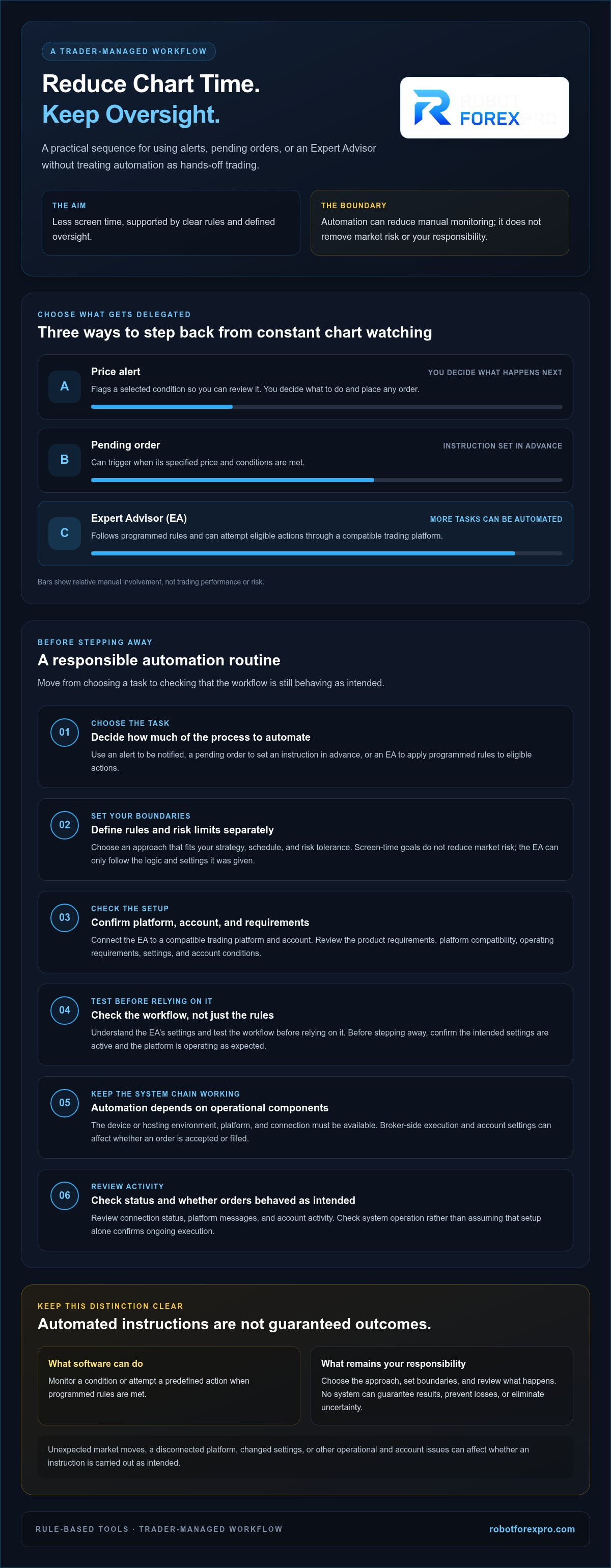
How to Set Up a Responsible Forex Routine Without Watching Charts All Day
Reducing chart time works best when you replace constant observation with a repeatable operating routine. Keep the decision about how much financial risk to take separate from the decision about how often to check prices. Automation can change your workflow, but it doesn’t make a trading risk acceptable or reduce it by itself.
Use this sequence to establish your process:
- Define risk limits. Decide what exposure you’re prepared to accept and what conditions would prompt you to pause or reassess. Don’t increase risk just because a system can place trades while you’re away.
- Configure the rules. Understand the EA’s intended behavior, settings, and configured risk parameters. Make sure its rules match the approach you mean to use.
- Test the workflow. Use a suitable non-live environment to learn how the EA and platform behave together. Check that settings, alerts, and order records are understandable before considering live deployment.
- Review activity. Check system status, connection, open positions, account exposure, and recent execution records on a regular schedule.
Set Limits and Test Before Relying on Automation
Read the EA’s documentation before enabling it. Understand what can trigger an action, which settings you control, and how configured risk parameters affect trading activity. Testing in a suitable non-live environment can reveal setup or workflow issues without making live trading the first trial. There’s no universal account size, risk percentage, or performance threshold that makes an EA suitable for every trader.
Create a Simple Review Schedule for Automated Forex Trading
Choose review points that fit the strategy, market conditions, and your circumstances. At each check, confirm the platform and connection are active, inspect open positions and overall account exposure, then review recent orders and execution records. Alerts can flag selected events or operational issues, but they don’t replace periodic checks. Adjust the routine if the system, trading approach, or your availability changes.
Automation still requires operational monitoring and risk review: check platform and connection status, open positions, account exposure, configured settings, and execution records. Keep the routine bounded and consistent. The objective is to trade forex without watching charts all day while retaining control of the decisions and oversight that remain yours.
Explore RobotForexPro Expert Advisors as rule-based tools for a trader-managed workflow.
Using a Forex Expert Advisor to Reduce Screen Time: Without Giving Up Oversight
An Expert Advisor can reduce the need to watch charts by carrying out programmed trading actions through a compatible platform. That changes who or what performs specific tasks. It doesn’t transfer responsibility for the trading plan, remove market uncertainty, or make ongoing review optional. You still set up the software, decide whether it fits your approach, and monitor account activity.
How to Assess Whether an Expert Advisor Fits Your Trading Workflow
Start with the EA’s documentation. Understand its intended market focus, rules, settings, platform compatibility, and operating requirements. Compare those details with your trading plan and the time you can commit to system checks. A product’s name alone doesn’t establish how it trades or whether it suits your strategy.
Review how configured parameters affect potential trading activity before use. Test the setup in a suitable non-live environment, and make sure you can interpret the platform’s status and execution records. Even an EA that fits your workflow can’t remove market risk, account exposure, or possible execution interruptions. To trade forex without watching charts constantly, plan for less manual observation, not less responsibility.
Explore RobotForexPro Expert Advisors as Trading Software
RobotForexPro develops and sells Expert Advisors for independent retail currency and gold traders. Its portfolio includes RFP MultiPair EA and RFP GoldenStar EA, as well as RFP Gold V5.7 EA, RFP AlphaHype EA, RFP JapanStrike EA, RFP EuroStable EA, and RFP SmartProfit EA. These product names identify software in the portfolio; they don’t, by themselves, establish a particular EA’s strategy or individual trading behavior. Use the product documentation to assess its rules and requirements.
These EAs are trading software for trader-managed use. They aren’t brokerage services or managed accounts, and they don’t eliminate your role in configuring, supervising, and reviewing the workflow. The practical fit depends on whether the software’s documented purpose and operating needs align with your plan and your capacity to oversee it.
If you want to reduce chart time, evaluate an EA as one component of your trading setup. Review the RobotForexPro Expert Advisor portfolio and assess which software, if any, fits your independent workflow. Keep responsibility for risk decisions and ongoing oversight in your hands.
Build a Lower-Monitoring Routine You Can Manage
You can trade forex without watching charts constantly by choosing the right level of automation for your plan. Alerts and pending orders reduce specific manual tasks; an Expert Advisor can execute predefined rules through a compatible platform. None removes market risk or the need to review system status, account exposure, and trading activity.
Keep risk decisions separate from screen-time goals. Understand the rules and requirements of any EA, test the workflow before live use, and set a repeatable schedule for oversight. Automation should make your process more structured, not less accountable.
RobotForexPro develops trading software for independent retail traders, with currency-focused, multi-pair, and gold-focused Expert Advisors in its portfolio. Explore the options and assess how they fit your own workflow.
Explore RobotForexPro Expert Advisors. Set clear limits, maintain oversight, and build a trading routine that supports your time without treating outcomes as certain.
Frequently Asked Questions
Can I trade forex without looking at charts?
Yes. You can trade forex without watching charts continuously by using alerts, pending orders, or an Expert Advisor (EA). Alerts notify you when a selected condition occurs, while pending orders can trigger under specified conditions. An EA can execute programmed rules through a compatible platform. These tools reduce some manual monitoring, but they don’t remove market risk or your responsibility to review trades, account activity, and system status.
Can a forex EA trade while my computer is off?
Not if the EA depends on a trading platform running on that computer. If the computer is off, the local platform and EA generally can’t monitor conditions or send actions. Running the setup on another suitable, active device or hosting environment may allow it to continue, subject to compatibility and operating requirements. Check the EA and platform documentation, and verify the connection and account status rather than assuming the system is active.
Is automated forex trading completely hands-off?
No. An EA can perform actions under programmed rules, but you still select the software, configure its settings, understand its behavior, and review its activity. Platform availability, connectivity, account conditions, and broker execution can affect the workflow. Markets can also move unpredictably. Treat automation as a way to delegate defined tasks, not as a substitute for risk decisions, operational checks, or ongoing oversight.
What is the difference between a forex alert and an Expert Advisor?
A forex alert notifies you when a selected condition occurs. You generally decide what to do next and place any trade yourself. An Expert Advisor can apply programmed rules through a compatible platform and attempt eligible trading actions automatically. An alert reduces repeated chart checking; an EA automates more of the workflow. Neither removes the need to understand the setup or review account activity.
Do I need a VPS to run a forex EA?
Not necessarily. An EA needs its compatible trading platform and operating environment to be running when it is expected to act. Some traders use a VPS to host a platform separately from their personal computer, but whether that suits your setup depends on the EA’s requirements and your operating needs. Review the product and platform documentation before choosing a hosting arrangement, then verify the system is connected and running.
How often should I check an automated forex trading system?
Set a repeatable review schedule that fits the strategy, market conditions, and your circumstances. At each check, review platform and connection status, open positions, account exposure, recent activity, and execution records. Alerts can flag selected events, but they don’t replace periodic reviews. Reassess the schedule if your trading approach, system setup, or availability changes. Don’t treat automation as proof that the workflow is operating correctly.
Can an Expert Advisor guarantee forex profits?
No. An Expert Advisor can follow programmed rules, but it can’t guarantee profits or prevent losses. Trading outcomes remain uncertain, and execution can be affected by market conditions, platform operation, connectivity, and account settings. Before using an EA, understand its rules and configured parameters, test the workflow in a suitable non-live environment, and continue reviewing its activity. Use automation as trading software, not as a promise of financial results.