

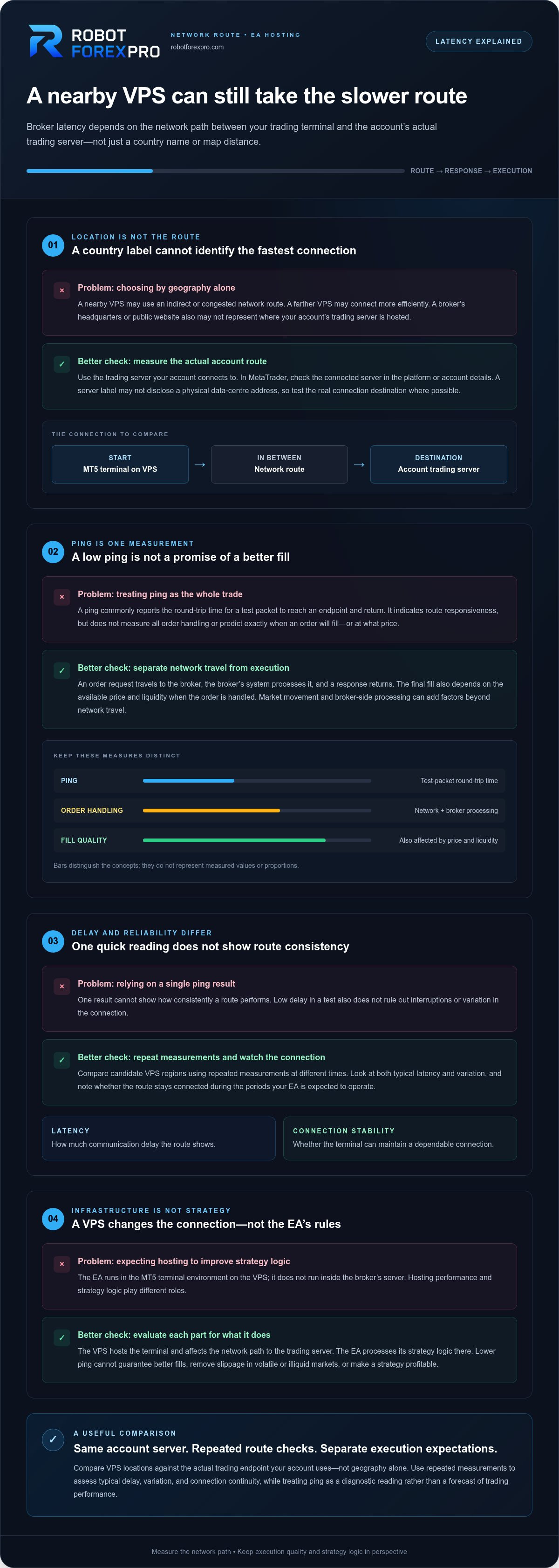
The VPS in the same country as your broker isn’t always the one with the fastest route. With vps location and broker latency explained, the key is the network path between your trading terminal and the broker’s actual trading server, not a country label or a map’s straight-line distance.
It’s reasonable to focus on latency when delayed orders and execution differences matter. But a lower ping is only one measure of network delay. It can’t guarantee better fills, remove slippage in volatile or illiquid markets, or make an EA strategy profitable.
This guide explains what latency measures, which part of the connection to test, and how to compare VPS regions with repeatable checks. You’ll also learn how to read ping results without treating them as a forecast of trading performance. That distinction helps you choose infrastructure using relevant evidence while keeping an EA’s strategy logic separate from the network that hosts it.
Key Takeaways
- Use the trading server your account actually connects to as the test destination, not the broker’s public website.
- Compare VPS regions with repeated measurements to see both typical latency and how consistently each route performs.
- With vps location and broker latency explained, you can distinguish a ping result from order processing, confirmation, and fill quality.
- Choose a location based on the measured network route and your setup’s needs, not geography alone.
- Evaluate hosting performance separately from EA strategy logic. Each plays a different role in deployment.
VPS Location and Broker Latency: What the Numbers Actually Mean
For an EA, latency is the time data takes to travel between the trading terminal running the EA and the broker’s trading server. Those are the endpoints to compare: the VPS terminal connected to your trading account and that account’s actual trading server. Comparing a VPS with your home computer, the broker’s website, or a server chosen only because it sounds nearby won’t answer the same question.
In engineering, latency describes delay as information moves through a system. The overview of Latency (engineering) provides useful context for applying that concept to network communication. In a trading setup, measurements are usually discussed in milliseconds. The number is useful, but only when you know what it measures.
What does broker latency measure in an EA setup?
When an EA sends an order, data travels from the platform on the VPS across one or more network routes to the broker’s trading server. A ping test commonly reports round-trip time: the time for a test packet to reach a network endpoint and return. It can indicate how responsive a route is, but it isn’t a complete measure of order handling or execution quality.
An order involves more than network travel. The trading platform sends the request, the broker’s system processes it, and a response returns. The final fill also depends on the available price and liquidity when the order is handled. Market movement can change prices during that interval, and broker-side processing can add time beyond the network trip. A low ping therefore doesn’t tell you exactly when an order will fill or at what price.
Think of ping as one diagnostic reading, not a score for the whole trade. A route may show a low round-trip time while an order still receives a different fill than expected. That distinction is central to vps location and broker latency explained: network delay is measurable, but it is only one part of execution.
Why broker headquarters may not reveal server location
A broker’s registered office or public-facing headquarters describes the company’s address, not necessarily where its trading infrastructure is hosted. A firm can operate from one city while its account servers sit elsewhere, and the network route can pass through additional locations. The broker’s name or home country therefore can’t establish the VPS-to-server distance.
Use the server endpoint associated with the trading account you’ll run on the VPS. In MetaTrader, check the connected server shown in the platform or account details. A server label can identify the account environment, but may not reveal a physical data-centre address. Test the actual connection destination where possible, rather than the broker’s marketing website or office address.
Keep the endpoints consistent when evaluating readings: use the same VPS terminal and the same account server. That gives you a meaningful baseline for comparing routes instead of relying on a country name that may not represent the path your EA’s orders actually travel.
How VPS Distance, Network Routes, and Broker Servers Affect Latency
A trading connection is a route, not a straight line on a map. The MT5 terminal on a VPS sends data through network equipment and provider networks before it reaches the broker’s connected trading server. Replies travel back along a network path that may not mirror the outbound route. Each segment can affect the time and consistency of communication.
Physical distance is one factor; the measured route determines network delay. A VPS in the same city as a broker’s server may be geographically close but still connect through a less direct route. A VPS farther away may have a more efficient network path. A country or city name can help narrow your options, but it can’t identify the fastest connection by itself.
Why the VPS-to-server route matters more than a country label
Packets move across interconnected networks, and the route depends on how those networks connect and direct traffic. Distance adds potential delay, while routing choices, network congestion, and the infrastructure along the path can also affect results. IBM’s explanation of network latency and its causes provides additional context on these factors.
A nearby VPS might send traffic through an indirect provider route or a congested network segment. It could perform more slowly or less consistently than its map distance suggests. Don’t assume one city or data centre is universally best. Compare routes from candidate VPS locations to the trading server used by your own account.
How terminal hosting and broker infrastructure interact
An EA runs within the MT5 terminal environment on the VPS. It processes its strategy logic there, while the terminal communicates with the broker’s trading server to submit and manage trading requests. The EA doesn’t run inside the broker’s server. The VPS location affects the network path between the terminal and that server, not the EA’s underlying strategy rules.
Keep two operational measures distinct. Latency describes communication delay; connection stability describes whether the terminal can maintain a dependable connection. A route may show low delay in a test but still experience interruptions or variation. A stable connection matters for an automated setup, but it doesn’t indicate how quickly a trading request will be processed or what price it will receive.
Turn the route into a deployment decision
Evaluate locations against the actual account endpoint, then observe the connection at different times rather than relying on one reading. Compare typical delay and variation, and note whether the route remains connected during the periods your EA is expected to operate. This gives you practical evidence for choosing infrastructure without treating geography as a performance guarantee.
Keep the roles separate as you plan deployment: the VPS hosts the terminal, the network carries its messages, and the EA supplies its strategy logic. RobotForexPro sells Forex Expert Advisors for independent trading setups. Explore Forex Expert Advisors as a separate part of your decision.
Does the Lowest VPS Latency Guarantee Better Forex Execution?
No. A lower latency reading shows that network data travels between a VPS and a broker server with less measured delay. It does not guarantee a better fill, lower trading costs, or a profitable result. Treat latency as one infrastructure measure, not a verdict on an EA or a promise about execution.
Latency can matter because trading requests move through a network, as explained in Cloudflare’s overview of latency. But a trade’s outcome also reflects factors that ping doesn’t measure: spread, available liquidity, price movement, volatility, and the broker’s processing of the request. These influences can change independently of the VPS route.
When lower network delay may matter
Reducing transmission delay may be relevant when an EA sends time-sensitive requests and the strategy is designed around rapid order handling. The practical effect depends on the strategy’s logic, trading frequency, and sensitivity to price changes. A system that trades less frequently may place less emphasis on small differences in network delay than one built around frequent, time-critical actions.
Use that distinction to assess your setup rather than assuming every EA benefits equally. A faster route can reduce one source of delay. It can’t establish that the EA’s rules will act at the right time or produce a better result.
What low ping cannot control
Markets keep moving while orders are sent and processed. During volatile conditions, the available price can change; limited liquidity can affect the price or quantity available for execution. Spread can also vary. A fast connection doesn’t freeze prices, create liquidity, or remove broker-side processing time.
Execution differences therefore shouldn’t automatically be attributed to VPS location. Compare what the network measurement represents with the conditions present when orders were placed. Low ping is not protection against losses, adverse price movement, slippage, or other market risks.
For an EA setup, separate four questions: how quickly the terminal communicates, how consistently it stays connected, how the broker handles requests, and whether the strategy fits your trading objectives. Latency alone can’t establish an EA’s profitability, reliability, or suitability. Those require separate evaluation of the software, its operating conditions, and risk controls.
This is the practical boundary in vps location and broker latency explained: lower delay may support time-sensitive order handling, but it cannot validate an EA or predict trading outcomes. Keep infrastructure testing and strategy assessment distinct. RobotForexPro offers automated Forex Expert Advisors for independent use, including currency- and gold-focused systems. Explore independent Forex Expert Advisors as a separate part of your setup decision.
How to Compare VPS Locations Against Your Broker's Server
Compare candidate VPS locations against the trading server your account actually uses. A broker’s public website is a different destination, so testing your VPS connection to it won’t measure the route used by your trading terminal. Use the same account endpoint and a consistent method for each candidate. The goal is a fair network comparison, not a prediction of future fills.
- Identify the account server. Find the connected server name in your trading platform or account details. Treat the label as an identifier, not proof of a specific physical address. If you can’t establish the endpoint to test from that label, use the platform’s own latency indicator as a separate reference rather than substituting the broker’s website.
- Set up the comparison. Use the same measurement method from each candidate VPS. A platform’s built-in latency display can help; a ping test can also be useful when you have the relevant server endpoint. Don’t compare readings from different destinations or tools as if they were equivalent.
- Repeat and record measurements. Take readings more than once and at different times. Record the test time, measurement method, typical result, and variation. A single unusually low reading doesn’t show how the route generally behaves.
- Decide from the evidence. Compare both delay and consistency, then weigh those results against your setup’s operational needs. Treat the measurements as network diagnostics, not a forecast of execution quality or trading performance.
Identify the trading server your account actually uses
In MetaTrader, check the connected server displayed in the platform or the account details. A server name may identify a service, account type, or cluster; it doesn’t necessarily reveal a street address or data-centre location. Avoid assigning precise geography from the name alone. For a meaningful comparison, keep the account and endpoint consistent across tests.
Measure and compare candidate VPS routes consistently
Run the same kind of measurement from each candidate VPS to the same account server endpoint. Keep a simple log of readings, times, and connection conditions. Compare the typical delay and how much it varies, not just the best result. If a tool can’t test the account’s actual endpoint, note that limitation and don’t treat its result as a direct route comparison.
Use the findings to select infrastructure, not to judge an EA’s strategy. Latency testing can help you compare network paths, but it can’t establish profitability or guarantee a particular fill. For the strategy side of an independent setup, explore Forex Expert Advisors separately from your VPS measurements. That’s the practical approach to vps location and broker latency explained: test the relevant route, compare results consistently, and keep network evidence in its proper scope.
Build a Practical VPS and EA Deployment Decision
A sound deployment decision combines network evidence with the needs of your trading workflow. Use measured latency and route consistency to assess connectivity. Then consider how often the strategy sends requests, how the terminal fits your operating process, and what level of connection continuity your setup requires. No single VPS region suits every broker, account, or EA.
Match infrastructure priorities to the trading workflow
Start with the route measurements you collected, but don’t select a location based on one low reading alone. Consider whether results stay consistent and whether the connection supports your normal operating routine. A latency-sensitive workflow may place more weight on reducing transmission delay. For a strategy where small network differences matter less, consistency and straightforward operation may carry greater weight. Decide based on your actual workflow, not a universal location ranking.
Define your operating priorities before choosing. Consider how you’ll monitor the terminal, respond to connection interruptions, and maintain the setup. These practical requirements are distinct from ping. A fast route is useful evidence about network delay, but it doesn’t establish the reliability of every part of the system or remove the need for operational oversight.
Keep EA evaluation separate from VPS evaluation
The VPS hosts the trading terminal. The EA runs within that terminal and applies its programmed strategy logic. They perform different jobs, so assess them using separate evidence. Network tests help compare connectivity; EA evaluation should focus on the software’s documented logic, intended use, and relevant testing evidence. A favorable VPS measurement cannot validate a strategy, and a strategy assessment cannot determine whether a particular network route is consistent.
For MT5 deployment, treat terminal configuration and network testing as distinct parts of the workflow. Keep a record of the EA version, account environment, and VPS route used during evaluation. That makes later observations easier to interpret and helps isolate whether a change came from the software setup or the hosting connection. Apply the same discipline when reviewing an EA’s strategy and risk parameters.
Use this framework to make a decision, then review it as your operating requirements change. Match the VPS route to the actual account connection, weigh latency against consistency, and assess the EA independently. This is the practical takeaway from vps location and broker latency explained: infrastructure supports software deployment, but it doesn’t guarantee a trading outcome.
RobotForexPro sells Forex Expert Advisors for independent traders, including gold-, currency-, and multi-pair-focused software. If you’re assessing the strategy-software side of your setup, explore the Forex EA portfolio.
Turn Your Measurements Into a Disciplined Next Step
Make your infrastructure choice a working baseline, not a permanent assumption. Record the VPS location, account server, and connection readings you used. Recheck the setup when your account environment, terminal configuration, or operating requirements change. That gives you a consistent reference point for deciding whether an adjustment is worth testing.
Keep the decision grounded in evidence. vps location and broker latency explained is ultimately about understanding what network measurements can guide, then applying that knowledge without treating it as a forecast of trade results. Evaluate hosting and strategy software on their own merits, and keep risk decisions separate from infrastructure decisions.
When you’re ready to assess the strategy-software side of your setup, Explore RobotForexPro’s Expert Advisors. Choose an EA that fits your independent trading setup, and evaluate it separately from your VPS connection.
Frequently Asked Questions
Does a VPS location change a forex broker's spread?
No. VPS geography doesn’t directly set the spread quoted by a broker. Network delay describes how quickly data travels between your terminal and the server; spread is part of the broker’s pricing and can vary with market conditions and account arrangements. For example, a spread may widen during a volatile period even if your VPS connection remains unchanged. Assess spread and network measurements separately rather than treating one as a cause of the other.
Can I run an MT5 trading terminal on a VPS in another country?
Yes, a remote computing environment can host an MT5 terminal even when the VPS is in a different country from you or your broker. Your account access and the platform’s requirements still apply. Keep the VPS country separate from the broker-server location: the former describes where the terminal runs, while the latter is the platform’s connection destination. Physical distance alone can’t determine the right setup; assess your actual workflow and account connection.
Does broker latency matter for a long-term trading strategy?
It can matter, but the strategy’s timing helps determine how much. A system that checks conditions and places orders infrequently may respond differently to network delay than one that reacts to short-lived price changes. Don’t infer investment results or risk from latency alone. Review documented system behavior over consistent periods, and consider whether delays coincide with missed or altered order handling. This gives you evidence about your setup without treating latency as the whole strategy assessment.
Can two VPS instances in the same city have different latency to a broker?
Yes. A shared city label doesn’t mean two VPS instances use identical network routes or experience the same conditions. They may connect through different providers or network equipment, so their measured response times can differ. Compare repeated readings from each instance to the same account server, using the same method and similar test conditions. Treat a data-centre name as a location clue, not proof that connectivity is equivalent.
Will a VPS prevent slippage when an EA places an order?
No. A VPS can change the network path and provide the environment where the terminal runs, but it can’t guarantee an execution price or prevent slippage. Prices may move while an order is processed, liquidity can vary, and broker-side handling also plays a role. For example, a rapid market move can affect a fill even when the terminal’s connection is responsive. A latency reading is not a promise of a particular execution.
Is broker server latency the same as MT5 ping?
Not exactly. MT5’s displayed ping is an indicator of network delay between the terminal and its connected server. Order execution can involve additional steps, including request handling and the market conditions present when the order reaches the broker. In the context of vps location and broker latency explained, use ping as one diagnostic reading. It can help describe connectivity, but it doesn’t measure every part of execution or indicate trading performance.