

The best automated forex trading software is not necessarily the product with the most impressive backtest. It is software that fits your trading platform, market focus, risk limits, and capacity to monitor it. Automation can apply rules consistently, but it can also magnify losses when a strategy or setup is poorly suited to live trading.
An Expert Advisor is not the same thing as the trading platform it runs on, the broker that executes orders, or a copy-trading service. Those distinctions matter when comparing products. Marketing claims alone won’t tell you whether software fits your setup, what oversight it needs, or how its risks are described.
This 2026 buyer’s guide gives you a consistent way to compare automated forex trading software by platform fit, operating model, risk controls, and performance evidence. You’ll learn what an EA does, how to assess claims beyond headline returns, and what technical requirements to consider. You’ll also see where options such as RFP MultiPair EA fit into the comparison, without treating performance claims as proof.
Key Takeaways
- Understand where an EA fits in a trading setup and how it differs from a terminal, broker, signals service, or managed account.
- Follow the path from market data to order execution, then review the EA’s documented logic and parameters to understand how it may behave.
- Compare automated forex trading software using consistent criteria: platform compatibility, strategy scope, risk disclosures, product documentation, and operating requirements.
- Assess your account, position sizing, monitoring capacity, and technical setup together before deciding whether automation suits your approach.
- Let your market focus and operating needs guide your next step, including whether to review RFP MultiPair EA for multi-pair requirements.
What automated forex trading software does, and what it does not do
Automated forex trading software applies programmed rules to market information and can generate or execute trade instructions through a compatible trading setup. An Expert Advisor, or EA, is one type of this software. Its role is to follow configured logic. It doesn’t remove uncertainty from currency markets or decide whether a strategy is suitable for a particular trader.
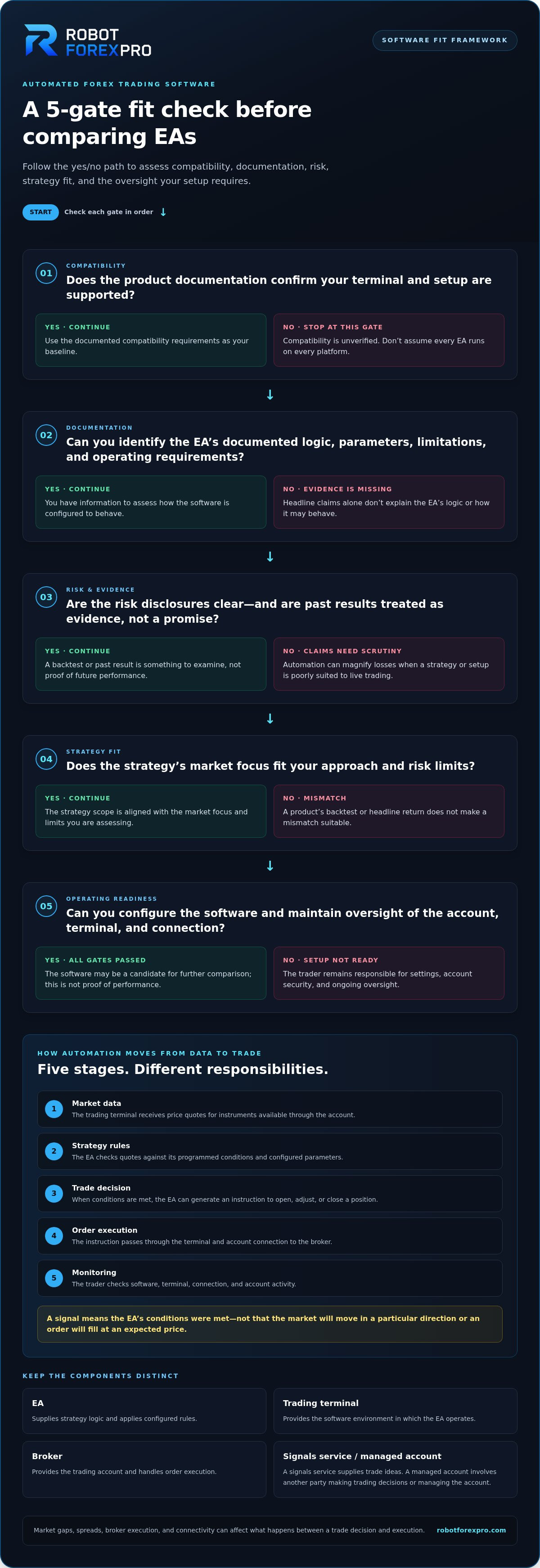
Keep the components distinct. The EA supplies the strategy logic. The trading terminal provides the software environment in which the EA operates. The broker provides the trading account and handles order execution. A signals service supplies trade ideas, which a trader may act on manually or through other tools. A managed account involves another party making trading decisions or managing the account, rather than simply selling software.
Quotable definition: “An Expert Advisor automates trading rules; it does not manage an investor’s account or guarantee an investment outcome.” This distinction helps buyers understand what they are selecting. Buying an EA is not the same as opening a broker account or handing over control of trading decisions.
Automation follows rules, but it does not eliminate risk. If the market moves sharply, the software may still trigger trades, even when conditions are unfavourable. A backtest or past result is evidence to examine, not a promise of future performance. When evaluating automated forex trading software, focus on documented logic, limitations, and operating requirements, not just headline claims.
How an Expert Advisor fits into a trading setup
An EA needs a compatible trading terminal to operate, and the terminal connects to the trader’s account through a broker. The trader remains responsible for account access, software configuration, and ongoing oversight. Compatibility depends on the EA’s technical requirements. Before installation, use the product documentation to establish which terminal and setup it supports. Don’t assume every EA runs on every platform.
A trader may have an account and terminal ready but still need to configure the EA and understand how to monitor its activity. Automation doesn’t transfer responsibility for account security, settings, or decisions about whether to continue trading.
What automated forex software cannot promise
Software can’t control market gaps, spreads, broker execution, or connectivity. These conditions can affect what happens between a trade decision and execution. A connection interruption may also disrupt monitoring or operation. Past performance doesn’t guarantee future results, and no programmed strategy can remove trading risk.
- Software: applies documented trading logic and settings.
- Brokerage: provides account access and trade execution.
- Investment management: involves another party managing trading decisions or an account.
RobotForexPro sells proprietary EA software, including RFP MultiPair EA. This software is separate from brokerage services, managed accounts, and guaranteed-return schemes. Treat promises of guaranteed returns as a warning, not a software feature. Evaluate an EA’s scope, operating requirements, and risk disclosures before deciding whether it fits your setup.
How automated forex trading software works from signal to execution
An automated strategy turns incoming market information into a possible trade by applying programmed conditions. The process has several stages, each of which can affect the final result. Understanding the sequence helps you distinguish what the EA decides from what the trading setup can execute.
- Market data: The trading terminal receives price quotes for instruments available through the account.
- Strategy rules: The EA evaluates those quotes against its programmed conditions and configured parameters.
- Trade decision: If the conditions are met, the EA generates an instruction, such as opening, adjusting, or closing a position.
- Order execution: The instruction passes through the terminal and account connection to the broker for execution.
- Monitoring: The trader checks that the software, terminal, and connection are operating as intended and reviews account activity.
Automation executes programmed rules, not certain outcomes. A trade signal means the EA’s conditions were met. It doesn’t mean the market will move in a particular direction or that an order will fill at an expected price.
From market data to an automated trading decision
An EA can compare current quotes with conditions defined by its strategy. For example, a hypothetical rule might look for a specified price relationship before generating an entry instruction, then use separate conditions to exit. This is not a description of an RFP product. Actual behaviour depends on the EA’s documented logic and configured parameters, so review both before trading.
Rules operate on the data and conditions available to them. A strategy that responds to a particular price pattern may behave differently as volatility, liquidity, or broader market conditions change. The software follows its logic; it doesn’t independently judge whether a market event makes that logic less appropriate.
Execution, monitoring, and system dependencies
The trading terminal runs the EA and passes its trade instructions through the account connection. The broker’s execution conditions then affect how an order is handled. Spreads can change, slippage can occur, and a live fill may differ from the price at which a rule triggered. These are execution factors, not changes to the EA’s underlying logic.
Live operation also depends on the required system being available. A disconnected account, closed terminal, or interruption in connectivity may disrupt the process. Monitor the terminal’s status and account activity, and understand the EA’s documented technical requirements. Don’t assume the software continues operating normally when its environment is unavailable.
Use this workflow to assess whether a strategy’s logic and operating needs align with your setup. If you’re evaluating multi-pair automation, review the RFP MultiPair EA overview alongside its product documentation. Focus on documented scope and requirements rather than assuming the product name describes every part of its behaviour.
How to compare automated forex trading software before buying
Use the same evaluation criteria for every EA. This keeps your decision grounded in documented fit and operating needs instead of marketing language or a striking performance screenshot. For each candidate, note what you can verify and what remains unclear.
| Criterion | Evidence to inspect | Question to answer |
|---|---|---|
| Platform fit | Current product documentation on supported terminals, versions, and technical requirements. | Does this EA work with my actual trading setup? |
| Strategy scope | Written description of instruments and strategy logic. | Does the stated scope match the markets I intend to trade? |
| Risk disclosures | Warnings and explanations of relevant trading risks and limitations. | Can I identify risks that matter to my account and tolerance? |
| Support materials | Installation guidance, user documentation, and explanations of settings. | Can I understand the setup and operate it correctly? |
| Operating requirements | Documented account, terminal, and system requirements. | Can I maintain the required setup and monitor activity? |
| Performance evidence | Records with methodology, dates, and drawdown context. | Does the evidence show more than a selected profit figure? |
Assess product fit and operating requirements
Start with the instrument scope. A product designed for a particular market may not suit a trader seeking exposure elsewhere, so don’t infer its scope from its name. Compare documented terminal compatibility and technical requirements with your own setup. Then consider the time and attention you can give to monitoring. If you can’t regularly review account activity and system status, that is an important limitation of the practical fit.
Apply the same checks to RFP MultiPair EA. Compare its product documentation with your multi-pair requirements. Don’t assume the product name establishes its supported instruments, platform, or technical configuration.
Evaluate evidence without treating performance as a promise
A single profit figure leaves out how the result was produced and what risk accompanied it. Screenshots and user posts can be selective, incomplete, or difficult to verify. Treat them as claims to investigate, not as a complete record of likely live behaviour.
Look for the measurement period, whether results are live or simulated, the methodology behind them, and the drawdown context. Drawdown shows the decline from a prior account peak, adding a risk dimension that a gain figure alone can’t convey. A guide to reading Myfxbook drawdown metrics can help frame that part of your review. Even detailed historical evidence can’t guarantee future results.
Separate verifiable product facts from promotional claims. Confirm specifications in product documentation, and don’t treat broad assurances or isolated performance images as proof. A short written scorecard makes gaps visible and lets you compare candidates without turning marketing claims into assumptions.
Is your trading setup ready for automated forex software?
Before enabling an EA, assess the full setup, not just the software. Platform compatibility, account conditions, risk limits, and your ability to monitor activity all affect whether automation is manageable. Use this checklist to identify gaps before committing funds to live trading.
- Platform: Does current product documentation list your trading terminal and its technical requirements? Compare those details with the exact setup you plan to use.
- Account: Do you understand the account’s trading conditions and how orders are handled? Consider account size alongside position sizing, since the amount at risk depends on both.
- Risk tolerance: Have you defined the loss you can accept and a point at which you would pause or reassess? Don’t rely on the EA to make that judgment for you.
- Monitoring: Can you review account activity, system status, and relevant changes in market conditions? Automation reduces manual trade entry, not the need for oversight.
- Technical readiness: Can your system meet the EA’s documented requirements and maintain a dependable connection? Decide how you’ll respond if the terminal or connection is interrupted.
To compare products against these readiness criteria, explore RobotForexPro’s EA software and review the relevant product documentation.
Define risk limits before enabling automation
Set your acceptable loss limits before deployment, then consider whether the EA’s documented operation fits those boundaries. Leverage can amplify both gains and losses, increasing the effect of price movements on an account. Avoid treating a suggested balance as universally suitable. Assess account size, position sizing, and risk tolerance together.
For more context on account-specific considerations, use this forex EA small-account readiness guide. It can help frame the practical questions to resolve before deciding whether your account is prepared for automated trading.
Prepare the technical environment and oversight routine
Match your terminal and system to the EA’s documented compatibility and operating requirements. Check that your account connection and internet access are reliable enough for the intended setup. Hosting may help support system availability, but uptime can’t control spreads, slippage, market moves, or whether a strategy performs profitably.
Set a repeatable review routine. Check that the terminal is operating, review account activity, and reassess the strategy’s suitability when conditions change. Continuous system availability doesn’t replace human supervision. If you can’t monitor the setup or respond to unexpected activity, delay live deployment until you have a workable oversight plan.
Choose an automated forex trading software option that fits your strategy
Choose by matching your intended market and operating needs to the product’s documented scope. A name can suggest a category, but it doesn’t replace product documentation. Apply the same evidence standards to every option, and rule out products that don’t fit your requirements.
Match the software category to the trading requirement
Start with the market you want to trade. If you need multi-pair automation, evaluate RobotForexPro’s RFP MultiPair EA against your requirements. For a gold-focused approach, consider RFP Gold V5.7 EA and compare its product information with your instrument requirements. RobotForexPro’s wider portfolio also includes RFP GoldenStar EA, RFP AlphaHype EA, RFP JapanStrike EA, RFP EuroStable EA, and RFP SmartProfit EA. Assess each product individually, without assuming its strategy scope or performance from its name.
| Your requirement | Product direction | What to establish in the documentation |
|---|---|---|
| Automation across multiple currency pairs | Evaluate RFP MultiPair EA | Confirm documented instrument scope, terminal compatibility, and technical requirements. |
| Gold-related trading focus | Review RFP Gold V5.7 EA | Establish the product’s stated scope and operating requirements before deciding whether it fits. |
| A different currency or gold trading approach | Compare the other RFP portfolio options individually | Use each product’s own documentation. Don’t infer strategy or risk characteristics from product names. |
If gold is your focus, use a consistent comparison framework and review this guide to comparing gold trading EAs alongside the product information. It can help keep your decision centred on evidence and fit rather than assumptions.
Review product information and take the next step
Before selecting automated forex trading software, apply the same checks to its documented instrument scope, supported terminal, technical requirements, risk disclosures, operating needs, and performance evidence. A product that fits your market but not your platform or capacity for oversight is not a practical match. Treat gaps in documentation as unanswered questions, not as proof of a feature or outcome.
Keep the decision specific. Write down the market you intend to trade, the setup you can support, and the evidence you need to assess. Then compare the relevant product information against those criteria. This helps you identify a suitable next step without relying on return claims or assuming one EA fits every trader.
Explore RobotForexPro’s automated trading software and compare the available EA options with your requirements.
Make your next move with clear criteria
Turn your comparison into a practical shortlist. Record your target markets, technical requirements, acceptable risk limits, and the evidence you still need. Then compare each candidate against that list before committing to a live setup. A disciplined selection process gives you a clearer basis for deciding whether automated forex trading software fits your approach, without relying on promised outcomes.
RobotForexPro’s proprietary Forex Expert Advisor portfolio includes multi-pair, currency-focused, and gold-related software options. Treat each as a distinct candidate and use its product information to assess fit for your requirements. Start with the category that matches your trading focus, then evaluate its documented scope and operating needs.
Explore RobotForexPro’s automated trading software and identify an option to assess against your criteria. A measured next step keeps the decision grounded in evidence and gives you a more controlled starting point.
Frequently Asked Questions
What is automated forex trading software?
Automated forex trading software uses programmed instructions to analyse market information and, depending on its setup, generate or place trade orders. An Expert Advisor (EA) is one type designed to operate through a compatible trading terminal. For example, a rule could tell the software to act when a defined price condition occurs. The trader still needs to understand the rules and the setup they require.
Is automated forex trading software profitable?
It can produce profitable trades, but profitability isn’t assured. Results depend on the strategy, market conditions, account setup, and trade execution. A strategy that performed well in historical testing may behave differently in live markets. Assess evidence over its stated period and consider losses as well as gains. Don’t commit funds you can’t afford to lose based on a profit claim or a short run of results.
Can automated forex trading software work without a broker?
To place live forex orders, an EA generally needs access to a trading account connected to a broker. The broker provides the account and processes orders; the EA supplies programmed instructions through its compatible terminal. Software can also be tested or studied without placing live trades, but that isn’t live execution. Keep the broker’s role distinct from the software provider’s role.
How do I choose automated forex trading software?
Start with your intended instruments and the trading setup you already use. Then compare each EA’s documented market scope, terminal requirements, strategy explanation, risk disclosures, and operating needs. For example, someone seeking multi-pair automation could assess RFP MultiPair EA against those requirements without inferring specifications from its name. Treat performance screenshots as incomplete evidence unless their context and methodology can be assessed.
Does automated forex trading software guarantee returns?
No. Software can’t guarantee trading returns, and claims of certainty shouldn’t replace a risk assessment. Currency prices can move against a strategy, while execution conditions can affect the outcome of an order. Before using an EA, decide what losses you can tolerate and how you’ll respond if results differ from expectations. Past performance is not a promise of future results.
Do I need to monitor an automated forex trading system?
Yes. Automation doesn’t remove the need to check account activity and system status. A terminal or connection issue could interrupt operation, while market conditions may change the relevance of a strategy’s rules. Set a practical review schedule and know how you’ll pause or reassess trading if the setup behaves unexpectedly. Monitoring supports oversight, but it can’t prevent every loss.
What is the difference between an Expert Advisor and copy trading?
An Expert Advisor follows programmed logic configured to operate through a trading terminal. Copy trading generally mirrors trades made by another trader or strategy in a separate account or service. The source of decisions differs: an EA uses its own rules, while copied trades depend on the activity being followed. In either case, review the risks and understand how trades reach your account.
Can beginners use an automated forex trading EA?
Beginners can use an EA if they understand its requirements and the risks of live forex trading, but automation isn’t a substitute for learning. Start by reading the product documentation and identifying how the EA’s decisions affect your account. Practising in a non-live environment can help you learn the workflow before risking capital. Avoid using settings you can’t explain.