

A low deposit threshold doesn’t prove an account can safely run an EA. A forex ea for small account trading must fit the account’s risk capacity, including its margin, minimum trade size, and ability to withstand drawdown. The balance shown at signup is only one part of the decision.
Before using an EA, review how it sizes positions and how many trades it may open at once. Minimum trade sizes can limit how precisely you control risk. Leverage may affect margin requirements, but it does not reduce the risk of losses.
This guide explains how to assess account readiness before deployment. You’ll learn how margin, position sizing, and drawdown affect suitability, and how to test an EA cautiously before considering live use. It also provides a practical monitoring process, so you can compare observed activity with clear limits instead of relying on a low entry deposit or optimistic claims.
Key Takeaways
- Judge suitability by whether the account can support the EA’s exposure and potential drawdown, not by the broker’s minimum deposit alone.
- Track equity, used margin, and free margin to understand how open-trade losses can reduce the room available for trading.
- Compare a forex ea for small account use by strategy scope, exposure, drawdown evidence, and operating requirements.
- Separate verified trading records from simulations, projections, and promotional claims when evaluating an EA.
- Use a demo test to observe execution behavior, compare results with your constraints, and decide cautiously whether to proceed.
Forex EA for a small account: what suitability really means
An EA is suitable for a small account only if the account can support its trading exposure through adverse price movement, not merely open its first trade. Exposure includes the capital committed to open positions and the potential loss if prices move against them. Drawdown helps you assess whether the account could absorb a decline without reaching a level you can’t accept or leaving too little margin to continue operating.
An EA automates trade execution according to its design. It doesn’t remove market risk, make losses predictable, or guarantee results. Algorithmic trading describes the broader use of computer programs to execute trading decisions. Automation changes how decisions are carried out, not the uncertainty of price movements.
What does small-account suitability mean for an EA?
Assess three limits together: risk capacity, available margin, and your own tolerance for losses. Account size alone can’t determine whether a specific system is appropriate. Two accounts with the same balance can face different practical constraints because trade sizes, leverage, and open positions differ.
Separate technical readiness from financial readiness. Technical readiness means the software can operate in its intended trading environment. Financial readiness means the account can support the EA’s exposure and withstand adverse movement without forcing you to close positions or add funds under pressure.
Assess realistic scenarios, not just labels. If an EA can open multiple positions, consider how the combined exposure could affect the account during an adverse move. Would you tolerate the resulting loss, and would sufficient margin remain? A small starting balance doesn’t make automated trading inherently safer. It can leave less room for losses and less flexibility to adjust position size.
Why minimum-deposit claims can mislead
A broker’s minimum deposit is an access requirement, not a prudent operating balance for an EA. Minimum trade sizes matter too. If the smallest permitted position is already large relative to the account, you may not be able to scale risk down as precisely as you need.
Minimum access is not evidence of suitable risk capacity. Treat a low entry threshold as permission to open an account, not proof that a particular EA can operate within your loss limits.
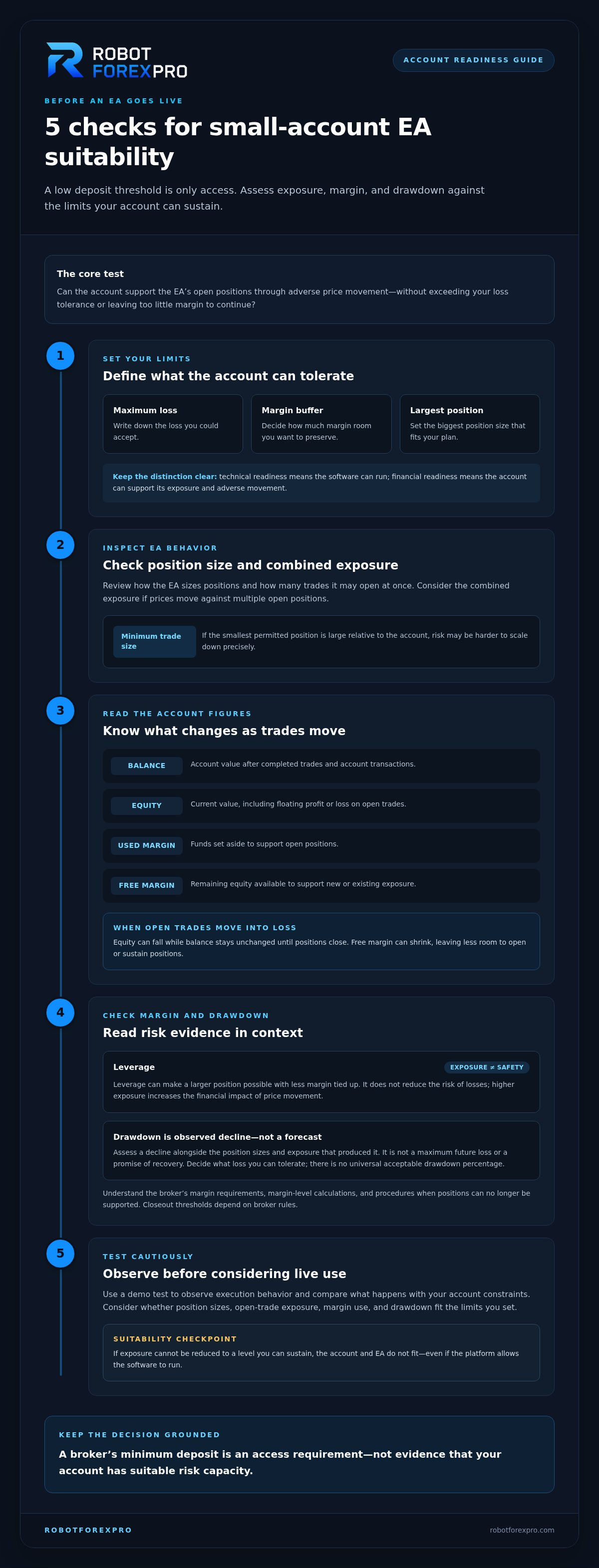
Before deciding, write down the maximum loss you could accept, the margin buffer you want to preserve, and the largest position size that fits your plan. Compare those limits with the EA’s documented trading behavior and requirements. If its exposure can’t be reduced to a level you can sustain, the account and system don’t fit, even if the platform allows the software to run. This distinction is central when assessing a forex ea for small account use: operational access and financial suitability are separate decisions.
How account size interacts with Forex EA margin and drawdown
Account size affects how much room an EA has to manage open positions. To assess that room, distinguish the platform’s key figures. Balance is the account value after completed trades and account transactions. Equity is the current value, including floating profit or loss on open trades. Used margin is the funds set aside to support those positions. Free margin is the remaining equity available to support new or existing exposure.
These figures change as prices move. If open trades move into loss, equity falls even though balance may not change until positions close. Free margin can shrink too, leaving the EA with less room to open or sustain positions. The platform’s margin level and closeout thresholds depend on the broker’s rules, so understand those mechanics before allowing an EA to trade.
How leverage and margin affect a smaller balance
Leverage describes market exposure relative to the capital committed as margin. It can make a larger position possible with less margin tied up, but high exposure also increases the financial impact of price movement. Margin is not a loss limit or protection against adverse movement.
Review the broker’s margin requirements, margin-level calculations, and procedures for positions that can no longer be supported. An EA operates within these account conditions and can’t override them. Before enabling automated trading, understand what could happen to open positions if equity declines or free margin becomes insufficient.
Why position size and drawdown must be assessed together
Position size determines how strongly a price move affects the account. The same adverse move has a larger financial impact on a larger position. Drawdown measures a decline in account value from a previous high over a stated period or record. It describes a past or observed decline, not a forecast, maximum future loss, or promise of recovery.
Read drawdown evidence alongside the position sizes and exposure that produced it. A reported decline may not represent the conditions your account will face, and a smaller account has less equity available to absorb losses in absolute terms. There is no universal acceptable drawdown percentage. Decide what loss you can tolerate, then consider whether the EA’s exposure and observed declines fit that limit. A separate account-balance lot-sizing guide can help you examine how position size relates to available capital. Keep that calculation distinct from assumptions about future performance.
For a forex ea for small account, assess the combined effect of position size, open-trade losses, and broker margin rules rather than treating any one platform figure as a safety signal. Once those constraints are clear, review the RobotForexPro EA portfolio as software you operate independently, not as a managed account. No EA can remove the risk of loss.
How to compare Forex EAs for a small account
Compare operating behavior, evidence, and account demands, not headline returns alone. Ask what the EA trades, how its positions could affect available margin, what drawdown evidence is available, and what conditions it needs to operate. Use the comparison below as a framework, not a ranking. Fill it with documented information and mark unknowns rather than replacing gaps with assumptions.
| Comparison area | What to examine | Why it matters |
|---|---|---|
| Strategy scope | Instruments traded, trade frequency, and whether positions may be open across instruments at once. | Scope affects how much activity you need to monitor and whether positions could create overlapping exposure. |
| Exposure | Position sizing, number of concurrent trades, and stated margin or account requirements. | These determine how the EA’s trading activity fits the account’s available margin and loss limits. |
| Drawdown evidence | Observed declines, the period covered, and whether results come from live trading, a backtest, or a simulation. | Drawdown gives context to performance and helps show how the system behaved under the conditions represented. |
| Operating requirements | Required trading environment, account conditions, and any stated operating constraints. | Requirements need to fit the actual account setup, not just the trader’s preferred balance. |
Compare the strategy with the account’s capacity
Start with instruments and activity. A currency-focused EA and a gold-focused EA may respond differently to market conditions, so don’t assume one risk profile applies to both. Gold and currency strategies can differ in price behavior and exposure. If a system trades multiple instruments, that doesn’t automatically diversify risk. Positions may be exposed to related market moves at the same time.
Next, compare the EA’s stated requirements with the account’s margin and your loss limits. Consider whether you can monitor its trade frequency and whether its activity could leave too little margin for adverse movement. A system that looks manageable when trades are assessed individually may create greater combined exposure when several positions are open.
Review performance evidence without assuming future results
Label the evidence precisely. A live record reflects actual trading under the conditions shown. A backtest applies a strategy to historical data, while a simulation models trading without establishing that the same outcomes will occur live. Record the period, market conditions, and type of evidence. Treat promotional language and projected outcomes as claims, not observed results.
Review drawdown alongside returns. Profit figures alone don’t show the decline an account had to withstand to produce them. No past record establishes future performance or proves suitability for your balance. For focused gold strategy context, use this gold trading EA comparison guide as a reference point, then assess the system against your own account constraints.
A forex ea for small account should not be declared suitable from its instrument label or promotional results. Require clear evidence, compare its exposure with your limits, and leave the decision open if operating details or drawdown evidence are missing.
How to test a Forex EA before using it on a small account
Use a controlled process before considering live deployment: document your limits, test in a demo environment, review what happens, and then decide whether to proceed. A demo lets you observe how the EA behaves without putting live capital at risk. It can reveal operational issues, but it can’t reproduce every live-trading condition.
Demo testing assesses operation, not future profitability. Use the test to compare observed behavior with documented requirements and your risk boundaries, not as proof of future results.
Create a pre-deployment checklist
Before starting, record the instrument, trading platform, broker conditions, and EA requirements stated by the provider. Configure the demo account to match the documented setup as closely as possible. Write down your personal loss boundary and a review schedule in advance. These records give you a consistent basis for evaluating the EA’s activity.
Then follow the stages in order:
- Document constraints. Note the account conditions, acceptable loss limit, intended instruments, and stated operating requirements. Define in advance what would trigger a pause.
- Run a demo test. Observe order activity and position behavior in a non-live environment. If you change conditions during the test, record what changed.
- Review observations. Compare actual activity with the EA’s documented strategy and requirements. Record deviations, interruptions, and differences between expected and observed execution.
- Decide cautiously. Proceed only if the evidence supports further consideration and the system’s observed behavior remains within your limits. A demo result does not establish that live use is suitable.
Monitor behavior and decide when to pause
Keep a concise log of equity, margin use, open exposure, order execution, and system interruptions. Review it on the schedule you set rather than relying on a brief stretch of favorable activity. Your records should help you spot changes and distinguish ordinary variation from behavior that conflicts with the system’s documented approach.
Pause the test and investigate if activity differs materially from the described strategy, the account setup no longer matches the stated requirements, or you reach your personal loss boundary. Don’t increase exposure to try to recover losses. A losing period is not evidence that performance will reverse, and continued testing should never depend on that assumption.
For traders assessing a forex ea for small account, testing is a way to make an informed decision before taking live risk. Keep your notes, limits, and review criteria consistent. To compare software options against those criteria, explore RobotForexPro’s proprietary EAs as tools you operate independently.
Choosing a RobotForexPro EA and taking the next step
Choose software only after establishing what your account can support. Readiness means understanding the EA’s trading focus and documented operating requirements, comparing its exposure with available margin, and setting a loss limit you can accept. Your demo review should also give you a clear record of how the system behaves. If those criteria remain unresolved, continue evaluating before considering live deployment.
RobotForexPro develops proprietary Expert Advisors for retail currency and gold traders. These are software tools traders operate independently. RobotForexPro is not a Forex broker or a provider of managed-account services. Choosing an EA does not transfer responsibility for account settings, risk limits, or trading decisions.
Match the software category to the trading focus
Start with the instrument scope. RFP MultiPair EA is one of RobotForexPro’s available products. Its name alone does not establish a particular exposure level or make it suitable for every account. Review its product information against your account conditions and the risk limits you have defined.
For gold-focused research, consider RFP GoldenStar EA or RFP Gold V5.7 EA. Their names identify products in the portfolio, but don’t establish account thresholds, performance, or specific operating settings. Treat each EA as a separate system to evaluate. RobotForexPro also offers currency-focused systems including RFP JapanStrike EA, RFP EuroStable EA, and RFP SmartProfit EA, as well as RFP AlphaHype EA. A currency-focused option and a gold-focused option may involve different market behavior, so don’t assume evidence about one applies to another.
Proceed with informed, independent evaluation
Before making a decision, compare each product’s documented scope and requirements with your own notes. Check whether the trading focus matches your objectives, whether the account configuration aligns with stated requirements, and whether exposure observed in testing stayed within your limits. Keep unknowns distinct from verified facts. Don’t fill gaps with assumptions or treat a product name as a risk assessment.
Operate the software independently and retain responsibility for trading decisions. An EA automates execution, but it cannot eliminate market risk or guarantee results. If actual trading behavior differs from what you evaluated, pause and reassess rather than increasing exposure or relying on an expected recovery. Your account balance, broker conditions, and tolerance for loss remain central to the decision.
A forex ea for small account use is not defined by a universal balance threshold. It depends on the relationship between the system’s documented requirements, the account’s capacity, and the trader’s willingness to accept risk. Review the available details at your own pace, then continue your independent evaluation with Explore RobotForexPro EA software. Consider live use only if the evidence and account conditions align with your established limits.
Make your next step evidence-led
The right next step isn’t to rush toward live trading. Treat your evaluation as an ongoing decision. Revisit it if account conditions change, the EA’s observed behavior shifts, or your risk limits no longer feel workable. A forex ea for small account use should remain within boundaries you can sustain, not depend on confidence that losses will quickly reverse.
RobotForexPro develops proprietary Forex Expert Advisors across currency-focused and gold-focused categories. Use the product information to identify software that matches your trading focus, then assess it against your account setup and risk tolerance. Automated execution does not transfer responsibility for trading decisions or remove the possibility of loss.
Take a measured next step. Explore RobotForexPro EA software, review the details, and proceed only when your independent evaluation supports it. A disciplined decision is progress, whether you choose to deploy an EA now or wait until your account is ready.
Frequently Asked Questions
How much money do I need to run a Forex EA?
There’s no single balance that works for every EA and account setup. To estimate readiness, identify the smallest trade size available, the margin required to open positions, and how much loss you could tolerate while keeping a reserve. For example, if the minimum position size would make even a modest adverse move exceed your personal loss limit, the account may be too constrained. A low broker deposit minimum isn’t a safe-balance recommendation for a forex ea for small account use.
Can a Forex EA guarantee profits on a small account?
No. An EA can automate execution, but it can’t guarantee profits or prevent losses. Treat claims about expected returns as claims, not certainty. Before risking capital, examine what evidence supports the claim, how losses and drawdowns are shown, and whether the evidence covers the conditions you care about. If a profit promise is presented as certain, don’t treat it as a substitute for your own risk assessment.
Can I use a Forex EA with a cent account?
Possibly, but the account label alone doesn’t establish compatibility. Confirm that the EA’s documented requirements match the broker’s account conditions, including how balances and trade sizes are displayed or calculated. A cent denomination can change how account values appear, but it doesn’t automatically reduce market exposure or make a strategy low-risk. Use a demo setup with the same account type to check that orders and displayed values make sense before considering live use.
Is demo testing enough to prove that an EA will work live?
No. A demo can show whether the software places and manages trades as expected in that test environment, but it can’t prove future performance or reproduce every live execution condition. Compare demo activity with the EA’s stated behavior, and note differences in order handling, pricing, or account configuration. A clean demo run is useful operational evidence, not proof that live results will match or that the system suits your account.
Can I run more than one Forex EA on a small account?
You may be able to run multiple EAs, but evaluate their combined activity first. Two systems can open positions at the same time, trade related instruments, or compete for the same margin, even if each looks manageable on its own. Record each system’s open trades and total exposure in a demo test. Don’t add another EA until you understand how the combined positions affect the account during adverse market movement.
Do I need a VPS to run a Forex EA?
Not always. Whether a virtual private server is useful depends on the EA’s documented operating needs and how you plan to keep its trading environment available. A VPS can host a trading platform remotely, but it doesn’t remove market risk or guarantee uninterrupted operation. Review the EA’s requirements and consider what happens if your local computer or internet connection stops. Test your chosen setup before relying on it for live execution.
What should I do if an EA uses more margin than expected?
Pause new deployment and investigate the difference before increasing funds or exposure. Compare the open positions, instrument, trade size, and broker margin calculation with your test notes and the EA’s documented requirements. Check whether several trades opened together or whether account conditions differ from the test setup. If you can’t explain the higher margin use, keep the system paused and reassess its fit. Don’t add capital simply to keep unexpected exposure running.