

What matters most when choosing forex trading robots ea mt4: advertised returns, or whether the EA fits your platform and trading plan? An automated EA can execute trades consistently, but it can also execute losses just as quickly. Automation doesn’t remove market risk, and performance claims are not guarantees.
To compare EAs, look at their stated currency-pair or gold focus, strategy descriptions, and available settings before activation. This guide covers the checks that matter: whether an EA is designed for MT4 or MT5, which instruments and strategies it targets, and how stop-loss, take-profit, and lot-size settings affect exposure.
You’ll also see how the products differ and why platform labels matter when a collection contains both MT4 and MT5 listings. Use these criteria to narrow your options and assess product details against your needs, not promises. Trading Forex, CFDs, and other leveraged products carries a high level of risk and may result in the loss of the entire investment.
Key Takeaways
- Separate the EA’s programmed rules from the trading strategy and the MT4 platform that runs it.
- Compare forex trading robots ea mt4 by platform, instrument focus, stated strategy, and available controls. A strategy label alone does not predict results.
- Compare product descriptions by their stated platform and market focus, including the USDJPY support-and-resistance approach described for JapanStrike V2.1.
- Treat stop-loss, take-profit, and lot-size settings as exposure-management tools, not safeguards against losses.
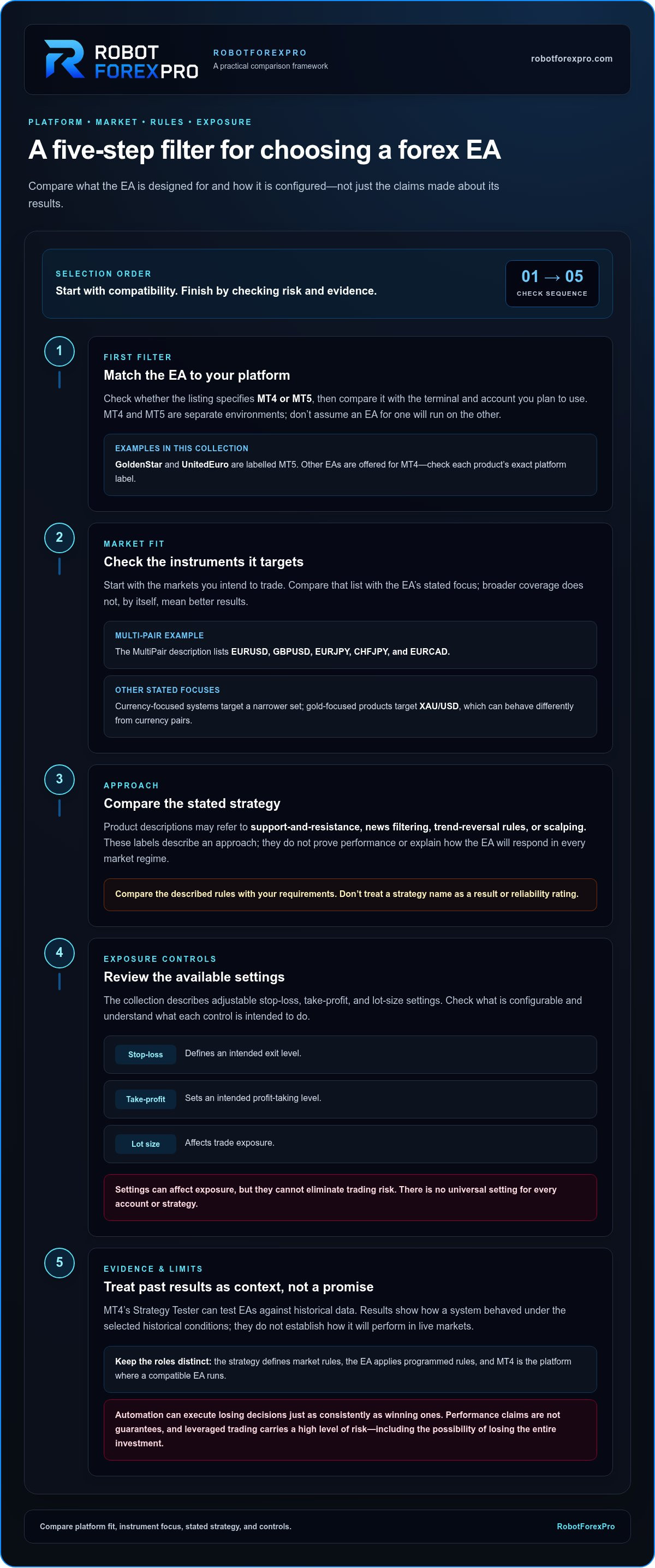
- Follow a clear selection sequence: match the platform, choose an instrument, compare the strategy, then review the controls before activation.
Forex trading robots for MT4: what an Expert Advisor does, and does not do
An Expert Advisor, a trading strategy, and MetaTrader 4 each have a different role. The strategy defines market rules, such as conditions for entering or exiting a trade. The EA is software that applies programmed rules to analyse market data or place trades. MT4 is the platform where a compatible EA runs. The phrase forex trading robots ea mt4 often combines all three ideas, but separating them makes product comparisons more precise.
An EA can automate rule-based analysis or trade execution. It can’t make an underlying strategy sound, predict market conditions with certainty, or guarantee a result. This approach is a form of algorithmic trading: software follows defined instructions, while market prices and trading conditions remain outside its control. Automation may reduce manual execution, but it can carry out losing decisions just as consistently as winning ones.
How an Expert Advisor works inside MetaTrader 4
A compatible EA runs inside an MT4 terminal and responds according to its programmed rules. Depending on how it is designed, it may analyse prices and indicators, identify a potential setup, or execute trades. That differs from discretionary trading, where a person interprets conditions and chooses whether and when to act. An EA follows its logic; it doesn’t independently understand context or replace the trader’s oversight.
MT4 provides MQL4, its programming language for creating trading tools, and Strategy Tester, a platform capability for testing EAs against historical data. These are MT4 features, not product features specific to RobotForexPro. Test results show how a system behaved under the selected historical conditions. They don’t establish how it will perform in live markets.
Why MT4 and MT5 compatibility must come first
Before comparing strategy details, check the EA’s stated platform against the MetaTrader terminal and account you plan to use. MT4 and MT5 are separate platform environments. Don’t assume that an EA labelled for one will run on the other. A platform mismatch can prevent the software from working as intended.
This collection includes MT4 and MT5 listings. GoldenStar and UnitedEuro are labelled MT5, while other EAs are offered for MT4. Match the exact product label to your terminal rather than relying on a shared product category or assuming every forex robot in the collection is an MT4 EA.
Compatibility is the first filter, not the final decision. Compare platform fit, stated strategy, instrument focus, and configurable risk controls against your requirements. Adjustable settings can help manage exposure, but they can’t eliminate losses. Trading Forex, CFDs, and other leveraged products carries a high level of risk and may result in the loss of the entire investment.
What to compare before choosing a forex EA for MT4
Compare each EA against the same criteria: platform, instruments, stated strategy, and configurable controls. This keeps product descriptions separate from assumptions about performance. A label such as “trend-reversal” describes an approach; it doesn’t show how the system performs in current market conditions. When comparing forex trading robots ea mt4, start with the platform and instruments, then assess the stated rules and settings.
| Comparison point | What to look for | What not to assume |
|---|---|---|
| Platform | Whether the listing specifies MT4 or MT5 | That one platform’s EA automatically works on the other |
| Instrument focus | Currency-specific, multi-pair, or gold-focused coverage | That broader coverage means better results |
| Stated strategy | Support-and-resistance, news filtering, trend-reversal, or scalping descriptions | That a strategy label proves performance or reliability |
| Configurable controls | Available stop-loss, take-profit, and lot-size settings | That settings remove market risk |
Match the EA's market focus to the instruments you trade
Start with the markets you intend to trade and compare them with the EA’s stated instrument focus. The MultiPair description lists EURUSD, GBPUSD, EURJPY, CHFJPY, and EURCAD. A currency-focused EA targets a narrower instrument set, while a multi-pair description covers several pairs. Gold-focused products target XAU/USD, which can behave differently from currency pairs. Consider the instrument and the system’s coverage together; don’t rank these categories by assumed performance.
Compare strategy descriptions and adjustable controls
Strategy descriptions can identify a system’s stated method, including support-and-resistance logic, news filtering, trend-reversal rules, or scalping. They don’t explain every condition or establish how the EA will respond in every market regime. Review the product description and settings to understand what the system is intended to do before considering live use.
The collection describes adjustable stop-loss, take-profit, and lot-size settings. A stop-loss defines an intended exit level, a take-profit sets an intended profit-taking level, and lot size affects trade exposure. There’s no universal setting that fits every account or strategy. An EA’s settings affect exposure but cannot eliminate trading risk.
Assess evidence without treating it as a promise
A product’s platform and strategy descriptions are different from observable trading-history evidence. If reviewing a Myfxbook profile, distinguish verification labels for account data or trading privileges from independent proof that an EA will perform well. Verification can support scrutiny of a record, but it cannot establish future results. A Federal Reserve paper on algorithmic trading in foreign exchange offers broader context on automated activity and market dynamics.
Use these criteria to narrow your options, then compare the forex EA collection by platform, market focus, stated method, and controls. Understand how the system behaves before using it on a live account. Past performance and advertised results don’t guarantee future outcomes.
Compare the collection's forex trading robots by platform and strategy
Product names and strategy labels are useful starting points, not performance ratings. The comparison below separates each listing’s stated platform, market focus, and strategy description. Use it to narrow the forex trading robots ea mt4 options to products that match your platform and instruments, then review the product details before choosing.
| Product | Stated platform | Instrument focus | Supplied strategy description |
|---|---|---|---|
| JapanStrike V2.1 | MT4 | USDJPY | Automated support-and-resistance logic |
| MultiPair EA | MT4 | EURUSD, GBPUSD, EURJPY, CHFJPY, EURCAD | Multi-pair EA; no specific strategy description stated here |
| EUROSTABLE V2 + V3.3 | MT4 | EUR/USD | News filtering |
| SmartProfit V2.1 | MT4 | Currency focus not specified | Trend-reversal EA |
| Gold EA V5.7 | MT4 | XAU/USD | Automated gold-focused EA |
| AlphaHype V3 | MT4 | EUR/USD | Configurable parameters and a stated stable strategy |
| GoldenStar | MT5 | XAU/USD | Strategy description not specified here |
| UnitedEuro | MT5 | EUR/USD | Scalping EA on the M1 timeframe |
MT4 options for currency pairs and multi-pair use
JapanStrike V2.1 is described as an automated USDJPY tool using rules-based support-and-resistance logic. MultiPair EA lists five instruments: EURUSD, GBPUSD, EURJPY, CHFJPY, and EURCAD. Coverage of multiple pairs does not automatically reduce risk or improve performance. EUROSTABLE V2 + V3.3 focuses on EUR/USD with news filtering, while SmartProfit V2.1 is described as a trend-reversal EA. These labels identify the stated approach; they don’t establish results.
MT4 options for gold and configurable EUR/USD strategies
Gold EA V5.7 is an automated XAU/USD tool. Its listing includes a capital-requirement caution, so factor that notice into your review before selecting it. Gold is a different instrument from a currency pair. Consider its exposure in the context of your account and trading plan.
AlphaHype V3 targets EUR/USD and is described as having configurable parameters and a stable strategy. Treat “stable” as product wording, not a promise of stable returns, low drawdown, or protection from losses. Review the available settings and understand their effect before use.
Identify the MT5 products in this collection
GoldenStar is an MT5 product focused on XAU/USD, not an MT4 EA. UnitedEuro is an MT5 EUR/USD scalping EA with an M1 timeframe, also not an MT4 EA. Match the exact product platform to your MetaTrader terminal. A similar instrument focus does not make an MT5 product compatible with MT4, or vice versa. Compare the listed descriptions as specifications, not as evidence that one product will outperform another.
Avoid common forex EA buying mistakes before you activate a system
An EA doesn’t make trading safe or ensure a profit. Automated systems can execute losing trades, and you can lose the entire amount invested. Don’t choose a product based only on a strategy label, advertised results, or a claim of reliability. Past or advertised performance does not guarantee future trading results.
Before activation, understand the EA’s platform, instrument, stated strategy, settings, and operating assumptions. A system designed for one market or terminal may not suit your setup. Read the product information rather than relying on its name or a headline claim.
Check compatibility, account setup, and operating assumptions
Confirm whether the EA is designed for MT4 or MT5 before purchase or installation. These are separate environments, so don’t assume cross-platform operation. Match the product’s stated instrument and strategy to the markets you intend to trade, then review the product details. Know what the EA is designed to do before enabling it.
Set risk controls with the possibility of loss in view
Stop-loss settings define intended exit levels, take-profit settings define intended profit-taking levels, and lot size affects trade exposure. These controls don’t prevent losses in every market condition, and no single set of values is right for every trader or system. Understand how each setting works and how it relates to your account before activation. Trade only with funds you can afford to lose.
Test and monitor rather than switching on blindly
Use a demo environment to learn how the EA behaves before considering live deployment. Observe how it responds to its stated market and strategy, and review its settings rather than treating activation as a one-time decision. A backtest reflects selected historical data and assumptions; a short trading record captures only a limited period. Neither can establish how the system will behave under future conditions.
Keep monitoring after setup. Check whether the EA is operating on the intended instrument and platform, and whether its actions remain consistent with the product description and your risk plan. If you’re evaluating MT5 systems, use testing information specific to MT5 rather than assuming that MT4 testing procedures or results transfer directly.
Use this final pre-activation check: match the terminal, confirm the instrument, understand the strategy, review each control, and assess the limitations of any performance evidence. Then compare the forex EA collection with those requirements. Select on fit and verifiable details, not implied certainty.
Choose a RobotForexPro EA and take the next step
Use a short decision path to narrow the options. Start with compatibility, then match the product’s stated market and method to your trading plan. This makes it easier to compare forex trading robots ea mt4 by concrete product details rather than promotional language or assumptions about performance.
Use a short decision path to narrow the collection
- Confirm your terminal. Identify whether you use MT4 or MT5, then choose an EA labelled for that platform. The collection contains both MT4 and MT5 listings, so don’t assume every product runs on your terminal.
- Select your market focus. Decide whether you want a specific currency pair, several listed pairs, or XAU/USD. For example, a USDJPY-focused tool and a gold-focused EA address different instruments and won’t necessarily suit the same trading plan.
- Compare the stated strategy. Review the product description for its supplied approach, such as support-and-resistance logic, news filtering, or trend-reversal rules. Treat the description as information about the system, not evidence of likely returns.
- Review the controls. Check the available stop-loss, take-profit, and lot-size settings. Understand how they affect exposure before activation; no setting removes market risk.
Browse the collection and review product details
RobotForexPro sells automated Forex Expert Advisors as software for independent retail traders. It isn’t a brokerage or managed-account service. Its products include currency-focused, multi-pair, and gold-focused systems, as well as EAs such as RFP GoldenStar EA, RFP MultiPair EA, RFP Gold V5.7 EA, RFP AlphaHype EA, RFP JapanStrike EA, RFP EuroStable EA, and RFP SmartProfit EA. Read each product description to compare its stated platform, instrument, strategy, and controls. Don’t infer specifications from a product name or category.
Use the same checklist for each candidate. A match on instrument alone isn’t enough if the platform differs or the stated strategy doesn’t fit your approach. Adjustable controls give you parameters to review, not protection from losses. Use the product details to understand configuration as you prepare to install and use an EA.
Before activating any EA, make sure you understand how it operates and what exposure its settings create. Automated trading doesn’t guarantee results, and you should trade only with funds you can afford to lose.
Ready to compare the listings against your platform, instrument, strategy, and control requirements? Browse Forex Trading Robots EA MT4.
Make Your EA Choice a Measured Next Step
Choose the forex trading robots ea mt4 option that fits your terminal, trading instrument, and approach. Treat setup as the start of evaluation, not a reason to switch off oversight. Review the product details before activation. RobotForexPro’s products include adjustable stop-loss, take-profit, and lot-size settings. Understand how configuration affects exposure, and keep your own risk limits in view.
Automation can execute trades, but it can’t remove uncertainty or guarantee an outcome. Proceed only when you understand the system and can afford the risk.
Compare the platform-specific listings and their product descriptions. Browse the Forex Trading Robots EA MT4 collection and take your next step with a clear, informed plan.
Frequently Asked Questions
What is a forex trading robot or Expert Advisor for MT4?
A forex trading robot, or Expert Advisor, is software that follows programmed rules in a compatible MetaTrader 4 terminal. It can analyse market data or place trades when its defined conditions are met. For example, an EA may act when a price condition in its code occurs, but it won’t interpret factors its rules don’t account for. The term forex trading robots ea mt4 refers to EAs intended for the MT4 environment.
Can an MT4 Expert Advisor run on MetaTrader 5?
Not automatically. MT4 and MT5 are separate platform environments, and an EA needs to be designed for the terminal it will run on. Check the exact platform label in the product description before installing. An MT5-labelled EA should not be treated as an MT4 product simply because both platforms use Expert Advisors. Choose a compatible version rather than assuming the software will transfer between terminals.
How do I choose a forex EA for the currency pairs I trade?
Start with the pairs you plan to trade, then compare them with the EA’s stated instrument focus. A USDJPY-focused EA may suit a different plan from one listing EURUSD, GBPUSD, EURJPY, CHFJPY, and EURCAD. Check whether the product is designed for one pair or several, and read its strategy description. A longer pair list doesn’t establish better performance or lower risk.
Are forex trading robots profitable?
Profitability isn’t assured. An EA can automate a strategy, but its results depend on its rules, market conditions, and trading costs, among other factors. A system that performed well in a selected historical period may behave differently as conditions change. Treat advertised returns and past results as information to assess, not promises. Automated trading can lose money, including the entire amount invested.
Can I test an Expert Advisor before using it on a live account?
Yes. You can first explore an EA in a demo environment to understand its operation without placing trades on a live account. MT4 also includes a Strategy Tester for examining an EA against historical data. Testing can reveal how the system behaves under chosen conditions, but results depend on the data and assumptions used. A demo or backtest cannot guarantee how the EA will perform live.
What risk settings should I compare when buying an MT4 EA?
Review the available stop-loss, take-profit, and lot-size controls. A stop-loss sets an intended exit level, a take-profit defines a target for closing a trade, and lot size affects the position’s exposure. Check how the EA uses each setting and whether you can configure them. There’s no universal configuration for every account or strategy, and these controls can’t remove the risk of loss.
Does RobotForexPro provide a forex broker or managed trading account?
No. RobotForexPro sells automated Forex Expert Advisor software for retail traders. It does not provide brokerage facilities, PAMM or managed-account services, or guaranteed-return investments. A trader using an EA operates it with their own trading setup and remains responsible for their decisions and risk. An EA purchase is a software purchase, not a brokerage relationship or an arrangement for another party to manage funds.